
GDPR compliance software vs Excel: when the spreadsheet stops being enough
Excel is a lawful place to keep GDPR records, and for a while it works. See what Article 30 really requires, where spreadsheets break, what they cost in hours, and when GDPR compliance software pays off.

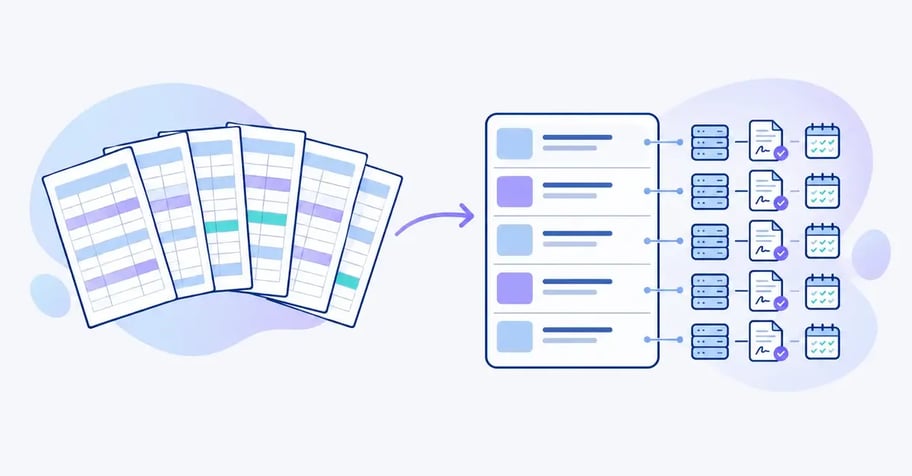
Most organisations built their first GDPR documentation in a spreadsheet. That was sensible. Excel is on every laptop, and a record of processing activities looks, at first glance, like a table with rows and columns.
The question DPOs bring to us is rarely whether a compliance spreadsheet is allowed. It is. The real question is when the spreadsheet stops helping and starts becoming a risk, and whether GDPR compliance software is worth the money. This article covers what the regulation actually asks of your documentation, what Excel does well, where it breaks, what the spreadsheet costs in hours, and how to migrate if moving is the right call.
The short answer: do you need GDPR compliance software?
Not necessarily. Keeping GDPR records in Excel is lawful and works well while the documentation is small, stable and owned by one person. The regulation sets requirements for the content of your documentation, not for the tool. Article 30(3) only says the record must be in writing, including in electronic form. A spreadsheet meets that.
The spreadsheet stops being enough when three things happen at once: several people need to update the documentation, the information links across record, agreements, risk assessments and audits, and you must show an authority or auditor who changed what and when. Once you pass roughly 30 to 40 processing activities, more than 15 to 20 processors, or more than one person writing in the file, GDPR compliance software is usually cheaper than staying put. Those figures are our own rule of thumb, not a legal threshold or a measurement. The worked example below shows how to run your own numbers.
What the GDPR actually requires of your documentation
The law requires you to be able to demonstrate compliance. That is the accountability principle in Article 5(2) of the GDPR (Regulation (EU) 2016/679), the seventh of the seven GDPR principles, and it is developed further in Article 24(1). The regulation says nothing about Excel, Word or software. The choice of tool is yours, judged on whether it lets you meet the documentation duties in practice.
The table lists the documentation duties that typically end up in a spreadsheet, and what each one needs to be able to do.
| Documentation duty | Legal source | What the documentation must be able to do |
|---|---|---|
| Record as controller | Art. 30(1)(a)-(g) | Describe purposes, categories of data subjects and personal data, recipients, international transfers, erasure time limits and security measures per processing activity |
| Record as processor | Art. 30(2) | Describe the processing you carry out on behalf of other controllers |
| Availability to the authority | Art. 30(4) | Be made available to the supervisory authority on request, in a current version |
| Processor agreements and audits | Art. 28(3)(h) | Show which processors have an agreement and that you audit or inspect them |
| Security of processing | Art. 32(1)(d) | Document regular testing and evaluation of your measures |
| Personal data breaches | Art. 33(5) | Log every breach, including those not notified, with facts, effects and remedial action |
| Impact assessments | Art. 35 | Link to the processing activities likely to result in a high risk |
| Data subject requests | Art. 12(3) | Track deadlines of one month, extendable by two further months |
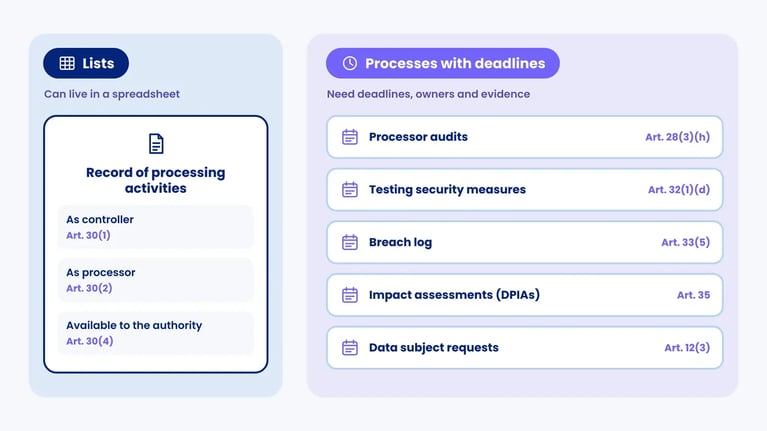
Only the first three rows describe a list. The rest are processes with deadlines, owners and evidence. A list can live in a spreadsheet. A process that runs year after year with several people involved needs something that remembers for you.
What a compliance spreadsheet does well
Casting Excel as the villain does not help you decide. A spreadsheet has real strengths when used for the right job.
- It is free and familiar. No procurement, no training, no vendor assessment of yet another system.
- It is flexible. You can build exactly the columns you need and change them in five minutes.
- It does more than its reputation suggests. Stored in SharePoint or OneDrive, several people can edit at the same time, and Microsoft 365 keeps a version history you can restore from. A worksheet holds 1,048,576 rows, so size is rarely the issue.
- It is a good export format. Auditors, customers and authorities can open it. Even dedicated tools for GDPR compliance usually export the record to Excel when someone asks for it.
Regulators use the same formats themselves. The UK Information Commissioner's Office offers its documentation template for controllers as an Excel file, and the Danish authority Datatilsynet publishes an example record as a Word document. That tells you something about what is sufficient in legal terms. If you have a GDPR template and a small number of stable processing activities, a spreadsheet can be the right choice.
Excel is not the problem. The problem starts when the spreadsheet is asked to do something it was not built for: keep track of relationships, deadlines and ownership across many people over many years.
Where GDPR in Excel breaks down
When we move documentation out of spreadsheets, we see the same five failure points. They do not come from poor work, but from the fact that a spreadsheet is a flat table and GDPR documentation is a network.
1. The relationships disappear
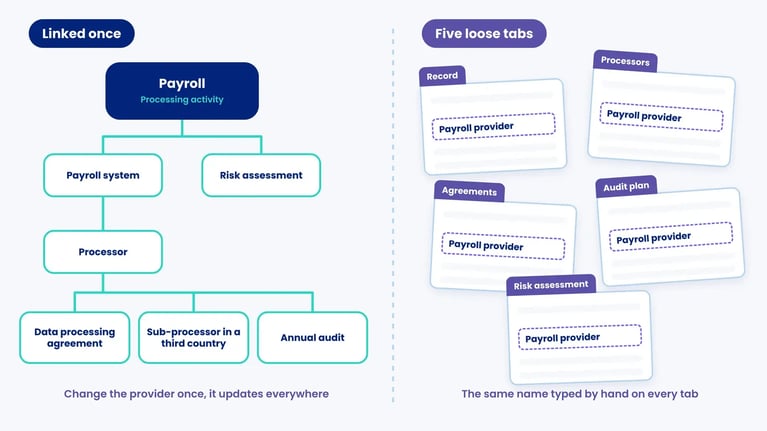
A processing activity such as payroll uses a payroll system. The system is run by a processor. The processor has a data processing agreement, a sub-processor in a third country and an audit that has to happen every year. The activity has a risk assessment and perhaps a DPIA. That is six or seven objects that all refer to one another.
In Excel each of them becomes a tab, and the links become text that has to be spelt identically everywhere. Change payroll provider and the name has to be corrected in the record, the processor list, the audit plan and the risk assessment. Miss one and the documentation contradicts itself. A tool with a real data model changes it once and the change flows through. That is the core of data mapping software.
2. Nobody owns the update
The facts in a record sit with system owners, HR, marketing and IT. The DPO owns the spreadsheet but not the details, so updating it becomes an annual email round of chasing. A spreadsheet cannot assign a task, send a reminder or show who has not replied.
This matters more in 2026 than it used to. On 19 March 2026 the European Data Protection Board launched its coordinated enforcement action for 2026, with 25 supervisory authorities examining compliance with the transparency and information duties in Articles 12 to 14. You cannot give people accurate privacy information if your record of what you process is two years out of date.
3. Deadlines run without alarms
A subject access request must be answered without undue delay and within one month under Article 12(3). A personal data breach must be notified to the supervisory authority within 72 hours under Article 33(1), and data subjects must be told without undue delay where the breach is likely to result in a high risk (Article 34). Processor audits usually follow an annual plan.
A spreadsheet can store a date, but it cannot warn you as the date approaches. The deadlines end up in personal calendars that vanish when someone changes jobs. Read more about handling subject access requests and security breaches.
4. The audit trail is thin
Version history in Microsoft 365 shows that the file changed and who saved it. It does not easily show why a retention period changed from five years to three, who approved it and on what assessment. Those are exactly the questions the accountability principle invites, and a separate log on another tab scatters the documentation again.
5. The file itself becomes a risk
A GDPR spreadsheet rarely holds much personal data, but it holds a map of where the personal data sits and which suppliers have not been audited. That is sensitive business information, often on a shared drive that far too many people can open.
Spreadsheets with hidden tabs are a classic source of breaches. In October 2024 the UK Information Commissioner's Office fined the Police Service of Northern Ireland £750,000 after a spreadsheet containing the surnames, initials, ranks and roles of 9,483 officers and staff was published by mistake in August 2023. The personal data sat on a hidden tab that nobody removed before the file was released in response to a freedom of information request.
Raymond Panko's review of field audits (revised 2005) found errors in 94% of 88 audited spreadsheets, but those were mainly formula-heavy financial models. A GDPR record is mostly text, so the real risk is inconsistency, stale rows and lost versions.
GDPR compliance software vs Excel: the comparison
The table compares the two on the points that matter for a compliance function in an organisation with 50 or more employees. "Software" here means a dedicated GDPR compliance solution or GRC platform, not a home-built database.
| Aspect | Excel | GDPR compliance software |
|---|---|---|
| Lawful for the record? | Yes (Art. 30(3)) | Yes (Art. 30(3)) |
| Start-up cost | No licence, but you build the structure yourself | Licence and onboarding, but structure and templates already exist |
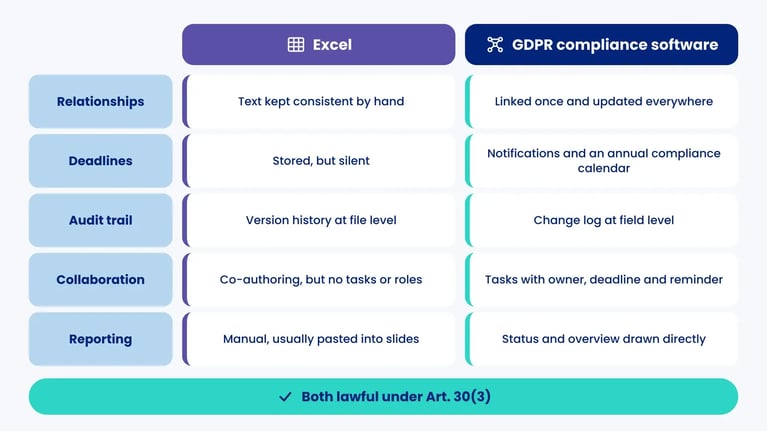
| Relationships between objects | Text kept consistent by hand | Linked once and updated everywhere |
| Collaboration | Co-authoring in Microsoft 365, but no tasks or roles | Tasks with owner, deadline and reminder |
| Deadlines | Stored, but silent | Notifications and an annual compliance calendar |
| Audit trail | Version history at file level | Change log at field level |
| Access control | On the file, rarely on the row | Roles and permissions in the system |
| Reporting to management | Manual, usually pasted into slides | Status and overview drawn directly |
| Several frameworks | One sheet per framework, duplicated work | Reuse across GDPR, NIS2 and ISO 27001 in a GRC platform |
| Best for | Few, stable processing activities and one owner | Many activities, several contributors and a need for evidence |
The most important row is the first one. Both are lawful. We know of no decision where the criticism was that documentation was kept in Excel. Criticism comes when documentation is out of date, incomplete or unusable for its purpose. Choosing a tool is about what makes that easiest to avoid.
What to look for in GDPR compliance software
Searches for the best GDPR compliance software return ranked lists, but a ranking cannot know your situation. These five criteria separate tools for GDPR compliance that keep your record current from tools that merely hold it.
- A data model, not a form. Processing activities, systems, processors, agreements and risk assessments should be separate objects linked to each other.
- Both halves of Article 30. If you act as a processor for anyone, the tool should hold your Article 30(2) record alongside your controller record.
- Tasks for the people who hold the facts. Look at the licence model. If every system owner needs a paid seat, the chasing will stay with the DPO.
- Honest migration. Ask who moves your existing spreadsheets, how long it takes and what it costs.
- A clean way out. You should be able to export the record to Excel at any time, for an auditor or if you change supplier.
Our guide to buying GDPR compliance software goes through procurement in more depth, and the article on features in GDPR compliance software covers the functionality side.
Your record of processing in Excel: what it must contain
The record of processing activities (RoPA) under Article 30 is the document most organisations keep in Excel. If you stay with the spreadsheet, at least make sure the columns cover the requirements. Under Article 30(1) the controller's record must contain:
- The name and contact details of the controller and, where applicable, any joint controller, representative and data protection officer (point a)
- The purposes of the processing (point b)
- The categories of data subjects and categories of personal data (point c)
- The categories of recipients, including recipients in third countries or international organisations (point d)
- Transfers to third countries and, for transfers under the second subparagraph of Article 49(1), documentation of suitable safeguards (point e)
- Where possible, the envisaged time limits for erasure (point f)
- Where possible, a general description of the technical and organisational security measures (point g)
The record is the controller's duty, not the DPO's, even if the DPO often maintains it. Supervisory authorities look for a clear link between which categories of personal data are processed about which categories of data subjects. That link is hard to hold in a flat table where one row has to cover employees, applicants and emergency contacts at once. Our guide to the record of processing activities walks through the fields in detail.
Do you have to keep a record at all?
Article 30(5) exempts enterprises and organisations with fewer than 250 employees. The exemption falls away if the processing is likely to result in a risk to data subjects' rights, is not occasional, or includes special categories under Article 9(1) or criminal offence data under Article 10. Almost every employer processes payroll and HR data on an ongoing basis, so in practice the exemption helps very few.
That may change. On 21 May 2025 the European Commission proposed, in its Omnibus IV package, that organisations with fewer than 750 employees should only need a record for processing likely to result in a high risk. On 9 June 2026 the Council and the European Parliament reached a provisional agreement on the Omnibus IV package, which law firms report includes the Article 30 relief. It still needs formal adoption, and advisers expect it to apply from around the turn of 2026 to 2027. The exact threshold depends on the adopted text, so check it before retiring anything.
Whatever the outcome, the accountability principle in Articles 5(2) and 24 remains. An up-to-date overview of your processing is also the basis for privacy notices, DPIAs and access requests, so it stays a working tool even if the formal duty is eased.
Five signs you have outgrown the spreadsheet
You do not need to switch because a vendor says so. Switch when the spreadsheet starts costing more than it saves. These five signs are the most reliable we know.
- You are unsure which file is current. There is a "RoPA_v7_final" and a "RoPA_v7_final_AdV". If the answer requires an email, it is time.
- Updating it takes more than one person. As soon as system owners and departments have to supply facts, the spreadsheet becomes an inbox without task management.
- You cannot answer a cross-cutting question quickly. "Which activities use processors with sub-processors in the United States?" If that takes more than ten minutes, the relationships are lost.
- Management or internal audit asks for status. If every status report means a day of counting rows and drawing charts, that day is wasted.
- You are adding frameworks. If you fall under a national NIS2 law or work to ISO 27001, supplier management, risk assessment and the incident log overlap with GDPR. In Excel that means duplicate work. Read more about GRC software that brings the frameworks together.
If three of these sound familiar, you are already paying for the spreadsheet in hours that simply never appear on an invoice.
A worked example: what does the spreadsheet really cost?
Veldhoven Logistics B.V. and Anna de Vries are fictional. We created them for this article, and they are not customers or a case study. The hours are assumptions, not measurements.
Veldhoven Logistics is a Dutch freight company with 180 employees and an Excel record covering 64 processing activities, 41 systems and 27 processors. Anna de Vries is a lawyer acting as DPO half time. She uses an internal hourly cost of €85 including overhead, an assumption you should replace with your own.
Anna tallies the year's work like this. The first column is her estimate with the spreadsheet. The second is her estimate for the same work in a system where system owners receive tasks directly and relationships only need correcting in one place.
| Annual task | Hours in Excel | Hours in software |
|---|---|---|
| Review of 64 processing activities | 96 (1.5 h per activity incl. chasing) | 64 (1 h per activity) |
| Reconciling processors against agreements and the record | 27 | 8 |
| Planning and following up processor audits | 20 | 12 |
| Four status reports to management | 24 | 4 |
| Clean-up after version conflicts and inconsistencies | 30 | 0 |
| Total hours | 197 h = €16,745 | 88 h = €7,480 |
| Licence | €0 | €2,400 (€200 per month) |
| Total annual cost | €16,745 | €9,880 |
The licence figure is the list price of the data protection module on .legal's pricing page as of September 2026. Other vendors price differently, so plug in your own quotes.
On Anna's assumptions Veldhoven saves around €6,865 a year. More important, the 109 hours she gets back can go on assessing risk. Notice that the review itself still takes 64 hours in software. A system removes the chasing and the double entry, not the professional judgement.
Run the same numbers for an organisation with 60 employees, 14 processing activities and 6 processors, and the picture flips. At the same rates it spends about 42 hours a year in Excel (€3,570) and 20 hours in software (€1,700 plus €2,400 licence, €4,100 in total). Here the spreadsheet is cheaper. That is the honest conclusion: size and complexity decide the sum, not the tool itself.
How to move your GDPR documentation out of Excel
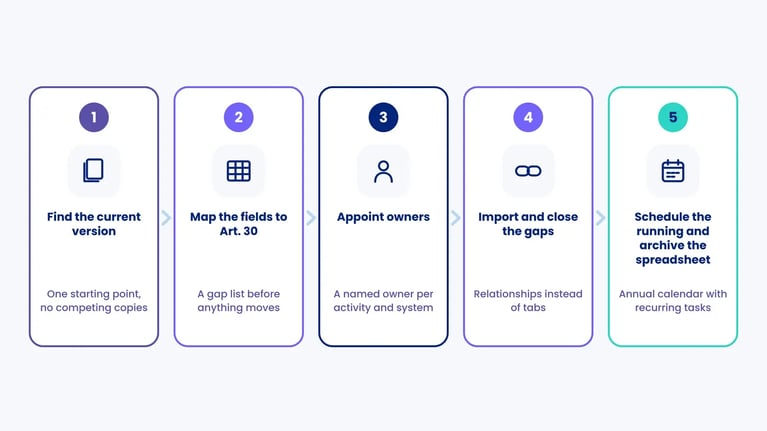
A migration is not an IT project. It is a clean-up you ought to do anyway. The five steps below work whichever system you choose.
| Step | What you do | Result |
|---|---|---|
| 1. Find the current version | Gather every spreadsheet, Word file and email thread, and name one file per area as the source of truth | A single starting point without competing copies |
| 2. Map the fields to Article 30 | Match your columns to Article 30(1)(a) to (g) and note which fields are missing or empty | A gap list before anything moves |
| 3. Appoint owners | Give every processing activity and system a named owner outside the compliance function | Someone to send the task to when something needs updating |
| 4. Import and close the gaps | Move the data in, link activities to systems, processors and agreements, and send the gaps out as tasks | One body of documentation with relationships instead of tabs |
| 5. Schedule the running and archive the spreadsheet | Put reviews, audits and controls into an annual calendar, and keep the old spreadsheet read-only as a record of history | Ongoing maintenance that does not depend on one person's memory |
Step 5 is the one most teams skip, and the old spreadsheet then lives on as a shadow version. Compliance task management makes sure the recurring work gets an owner and a date. The same applies to the data processing agreement each processor needs under Article 28.
What software will not fix
A system is a better frame, not better content.
- Software does not make you compliant. No platform knows what your processing activities are, which lawful basis you rely on or how risky they are. You still have to assess that.
- Bad data stays bad. Move an outdated spreadsheet into a system and you have an outdated system. Migration makes the gaps visible, it does not close them.
- Adoption needs owners. If nobody outside compliance ever logs in, you have bought an expensive spreadsheet. The tasks have to reach the people who know the facts.
The method behind a sound risk assessment is covered in our article on information security risk management across GDPR, NIS2 and ISO 27001.
How .legal supports the move from spreadsheets
Our data protection module is built to bring scattered spreadsheets, Word files and email threads into one place. You export what you have from Excel or Word, and we structure it in the platform for you as part of onboarding, typically within two weeks and at no extra cost. We do not fill the gaps for you, but we point them out.
The record covers both Article 30(1) as controller and 30(2) as processor. Processing activities link to systems, processors and agreements, every change is registered in a change log, and process validation tells you when an activity is due for review. Recurring reviews and processor audits become owned tasks in the annual calendar. Users are unlimited, so system owners answer for themselves, and the record exports to Excel whenever an auditor asks.
If you also manage suppliers, contracts or NIS2, processor audits and vendor management sit in the same platform, so each supplier is registered once. To see what your own spreadsheet would look like in the platform, book a demo.






.png?width=600&height=400&name=securitybreach-feature%20(1).png)




.legal compliance platform
Upgrade from Excel to .legal Compliance Platform
-
Automated workflows replace manual spreadsheet updates
-
Real-time collaboration instead of version conflicts
-
Built-in audit trails for every compliance action
-
Easy migration from existing Excel-based processes





.jpeg?width=131&height=26&name=right_people_logo%20(1).jpeg)

.jpg?width=58&height=26&name=Praktiserende%20L%C3%A6gers%20Organisation%20(1).jpg)
.jpg?width=108&height=26&name=finans%20danmark%20(1).jpg)


.jpg?width=89&height=26&name=klasselotteri%20(1).jpg)

-1.png?width=34&height=26&name=bws_shipping_rgb%20-%20Kopi%20(2)-1.png)



.jpeg?width=135&height=26&name=AH%20industries%20(1).jpeg)






.jpg?width=225&height=26&name=KAUFMANN%20(1).jpg)