
Email security: encryption, DMARC and phishing protection under GDPR and NIS2
Email security means three things: encrypted content, a genuine sender and staff who can spot a phishing email. See what GDPR and regulators expect, when TLS is enough, and how to roll out DMARC.

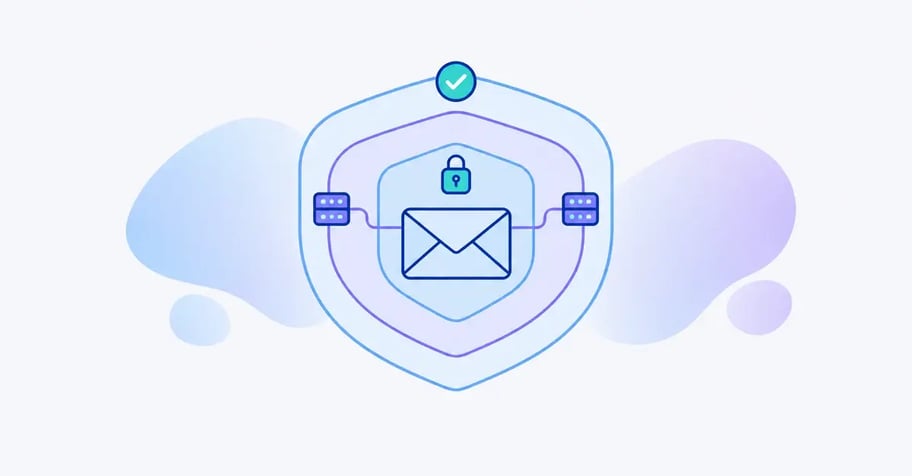
Email is still where most organisations send contracts, payslips, medical notes and candidate files. It is also where phishing lands, and one of the places personal data most often ends up with the wrong person. When people search for email security, they are usually asking several different questions at once.
A DPO wants to know whether a CPR number, an NHS number or a diagnosis can go in an email. An IT manager wants DMARC sorted because Gmail or Outlook has started rejecting the newsletter. A CISO wants staff to stop clicking on phishing links. This guide answers all three.
We cover what GDPR Article 32 actually requires, how European regulators have turned that into concrete expectations, the difference between TLS and end-to-end encryption, the SPF, DKIM and DMARC rules the big mailbox providers now enforce, and where email fits into NIS2. We finish with a worked example and an honest list of what email security does not fix.
The short answer: what does email security require?
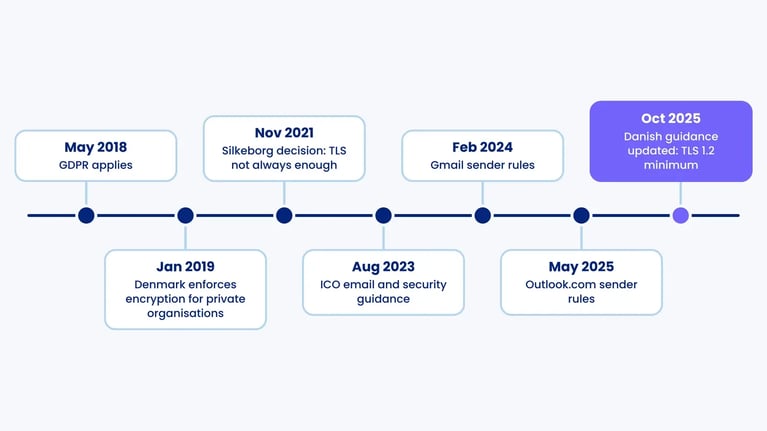
If you send sensitive or confidential personal data over the internet, treat encryption as the default. The Danish regulator, for example, sets TLS 1.2 as the floor for transport encryption and has found that TLS alone is not always enough when an email carries a large volume of sensitive data. In that case the content itself should be encrypted, with S/MIME or a secure portal. Every domain you own should have SPF, DKIM and a DMARC policy, so nobody can send phishing in your name. None of this stops an email going to the wrong recipient, so procedures and training remain part of good email security.
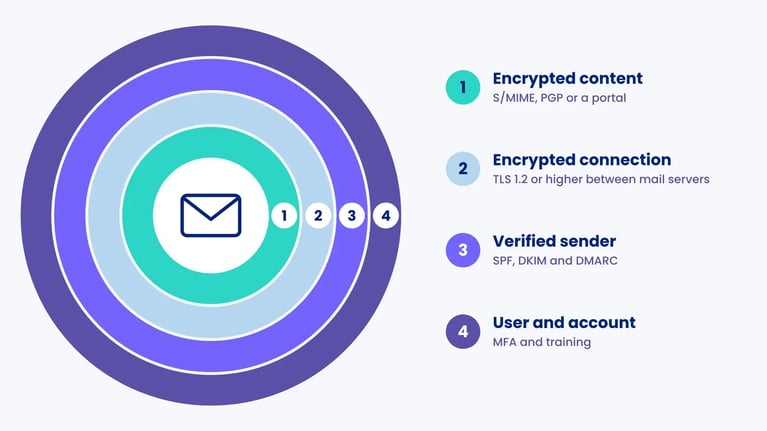
Four things people mean by email security
The term covers several protections that solve different problems. The most common mistake is assuming one of them covers the others. An email can travel over an encrypted connection and still come from a forged sender, and a perfect DMARC record says nothing about whether the content can be read along the way.
| Protection | What it protects | What it does not protect | Typically required by |
|---|---|---|---|
| Transport encryption (TLS) | Confidentiality between two mail servers while the message is in transit | Content stored on servers, misdirected emails, forged senders | Supervisory authorities (TLS 1.2 minimum), NCSC guidance |
| Content encryption (S/MIME, PGP, portal) | The message and attachments all the way to the recipient | Metadata such as sender, recipient and subject line (depending on the tool) | Your Article 32 risk assessment, when TLS is not enough |
| Sender authentication (SPF, DKIM, DMARC) | That email from your domain is genuine and unaltered | Confidentiality, and lookalike domains | Gmail and Outlook.com for bulk senders, public sector standards |
| Account and user security (MFA, training) | Mailboxes from takeover, staff from social engineering | Technical weaknesses in transport or DNS | NIS2 Article 21(2)(g) and (j), GDPR Article 32 |
What the law actually requires
GDPR Article 32: appropriate, not prescribed
GDPR Article 32 does not tell you to encrypt email. It requires controllers and processors to implement appropriate technical and organisational measures, taking into account the state of the art, the cost and the risk to individuals. Article 32(1)(a) names encryption as one example, and Article 32(2) specifically points to the risk of unauthorised disclosure of data that is transmitted. Infringements of Article 32 fall under Article 83(4), with fines of up to EUR 10 million or 2% of global annual turnover.
Because the text is risk-based, the useful question is how regulators interpret it for email. Their answers are more concrete than the regulation.
How regulators translate it: Denmark as a worked case
The Danish Data Protection Agency (Datatilsynet) has the most explicit position we know of. In July 2018 it announced that encrypting emails containing confidential and sensitive personal data sent over the internet would normally be an appropriate measure for public and private organisations alike, and it enforced this for the private sector from 1 January 2019. Its catalogue entry on secure transmission, last updated on 17 October 2025, states that the encryption must be at least TLS 1.2.
The agency has also shown where TLS stops being enough. In a decision of 25 November 2021, Silkeborg Municipality received serious criticism after an employee emailed a list with the national identification numbers of 12,915 pupils without content encryption. The agency said that transport-layer TLS is not always sufficient when large amounts of confidential or sensitive data are sent, and that the TLS 1.1 the municipality used could not be regarded as appropriate.
Other points from the same guidance are useful anywhere in the EU. Forced TLS, where the message is not sent unless a strong connection can be set up, is preferable to opportunistic TLS. An encrypted attachment is acceptable if the password is strong and goes by a different channel. And individuals cannot consent to a lower level of security than your risk assessment requires, even if they ask for a plain email.
The UK view: the ICO on email
For UK organisations, the ICO's email and security guidance, published in August 2023, applies UK GDPR Articles 5(1)(f) and 32. It compares unencrypted emails to postcards that can be read at any server they pass through. It also warns that BCC is not enough on its own when sensitive information is involved and says organisations should use bulk email services, mail merge or secure data transfer instead. The guidance followed a string of reprimands, including one to NHS Highland in March 2024 over an email to people likely to be using HIV services.
TLS or end-to-end: which encrypted email do you need?
For most organisations, email encryption in practice means TLS, because modern mail systems do it automatically. The connection between two servers is upgraded through STARTTLS, defined in RFC 3207. The message still sits unencrypted on the sending and receiving servers, and if any server in the chain refuses TLS, opportunistic TLS silently falls back to plain text.
The NCSC's email security and anti-spoofing guidance recommends closing that gap for inbound mail with MTA-STS, which tells sending servers to always use TLS 1.2 or higher and never downgrade, and with TLS-RPT (RFC 8460) to report failures. DANE achieves a similar result for domains signed with DNSSEC.
End-to-end encryption means the content is encrypted by the sender and can only be read by the recipient. That requires the recipient to have a key, a certificate or access to a portal.
| Method | How it works | Strength | Weakness |
|---|---|---|---|
| Opportunistic TLS | Encrypts the connection if the receiving server offers it | Nothing required from users | Can fall back to plain text without warning |
| Forced TLS or MTA-STS | Refuses delivery unless TLS 1.2 or higher can be set up | Meets the TLS floor every time | Does not protect content stored on servers |
| S/MIME | Encrypts and signs with X.509 certificates | Built into Outlook and Apple Mail, adds a signature | Recipient needs a certificate, keys must be managed |
| OpenPGP | Encrypts with key pairs the parties exchange themselves | Open standard, strong cryptography | Hard for non-technical users, rare in business |
| Secure email portal | Recipient gets a link and logs in, often with a one-time code | Works with any recipient, including the public | Needs a provider who is your processor |
| Encrypted attachment | File is encrypted, password sent by another channel | Cheap and quick for one-off cases | Depends on strong passwords and discipline every time |
When recipients are members of the public, candidates or customers without certificates, S/MIME is rarely realistic, and a portal with login is the practical choice. The provider processes personal data on your behalf, so you need a data processing agreement under Article 28 and ongoing oversight of that provider.
SPF, DKIM and DMARC: proving your email is genuine
Encryption protects the content. Authentication protects the sender. Without it, anyone can send an email that appears to come from your domain.
- SPF (Sender Policy Framework) is a DNS record listing the servers allowed to send email for your domain.
- DKIM (DomainKeys Identified Mail) adds a cryptographic signature so the recipient can check the message was not altered.
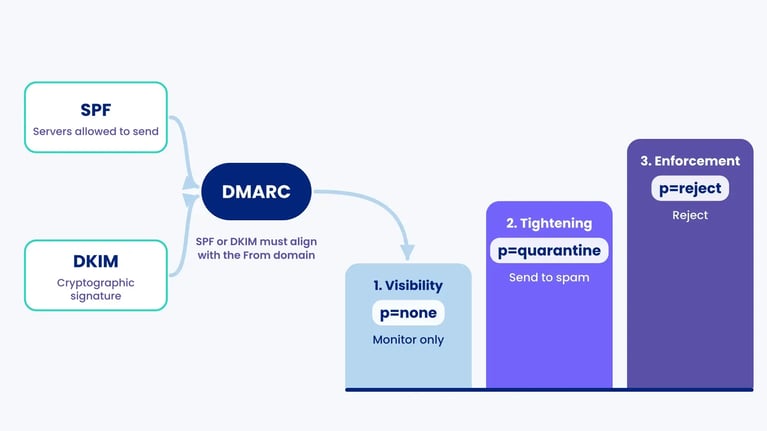
- DMARC ties the two together, requires the visible From domain to align with SPF or DKIM, and tells receivers what to do with mail that fails. The policy can be none (monitor only), quarantine (send to spam) or reject.
DMARC has moved from good practice to a condition of delivery. Since 1 February 2024, Google has required SPF, DKIM, DMARC and TLS from anyone sending more than 5,000 messages a day to Gmail accounts. From 5 May 2025, Microsoft introduced equivalent rules for senders of more than 5,000 messages a day to Outlook.com, Hotmail and Live addresses, and non-compliant mail is now rejected. Both accept p=none, but p=none does not stop anyone spoofing your domain.
Public sector standards go further. The NCSC guidance treats p=reject as the end goal, and Denmark's technical minimum requirements for central government, updated in September 2025, require DMARC reject on every domain, SPF on all domains and subdomains, DNSSEC and DANE for inbound mail gateways.
| DMARC phase | Policy | What you do | When to move on |
|---|---|---|---|
| 1. Visibility | p=none with an aggregate report address (rua) | Find every system sending as you: CRM, payroll, newsletters, helpdesk | When all legitimate senders pass SPF or DKIM with alignment |
| 2. Tightening | p=quarantine, optionally with pct below 100 | Watch the reports and fix the last senders | When no legitimate mail is landing in quarantine |
| 3. Enforcement | p=reject, including subdomains | Protect domains that never send email with a reject policy too | Ongoing monitoring whenever a new system is added |
You can test a domain free of charge with the NCSC email security check.
How to spot a phishing email
The ENISA Threat Landscape 2025, published on 1 October 2025 and based on 4,875 incidents between July 2024 and June 2025, found phishing to be the leading initial intrusion vector at around 60% of observed cases, ahead of vulnerability exploitation at 21.3%. In the UK, the Cyber Security Breaches Survey 2025/2026, published on 30 April 2026, found that 43% of businesses had a breach or attack in the previous 12 months and that phishing remained by far the most common type, experienced by 38% of all businesses.
Generative AI has made spelling mistakes an unreliable signal. Train people to look at what the email is asking them to do instead.
| Warning sign | Example | What the employee does |
|---|---|---|
| Urgency or authority | "The CEO needs this transfer before 2pm" | Call back on a known number, never the one in the email |
| Changed bank details | "We have moved banks, please use this account" | Verify through a second channel before anything changes in finance |
| Login link | "Your password expires today, sign in here" | Go to the service via a bookmark, not the link |
| Lookalike domain | dot1egal.com instead of dotlegal.com | Hover over sender and link, read the domain from the right |
| Unexpected attachment or QR code | "See attached invoice" from an unknown supplier | Do not open, use the report button in the mail client |
The costliest variant is often business email compromise, where there is no link or attachment, only a convincing request. Only fixed payment procedures and a culture where it is fine to phone and check will stop it. Read more in our articles on anti-phishing and awareness training.
If someone has clicked and entered a password, reset it, revoke active sessions and check the mailbox for new forwarding rules. If the attacker could access personal data, you have a personal data breach to assess, and unless it is unlikely to result in a risk, it must be notified to the supervisory authority within 72 hours under Article 33.
NIS2 and ISO 27001: email as part of your cryptography policy
For entities in scope of NIS2 (Directive (EU) 2022/2555), email is more than a GDPR question. Article 21(2) lists ten minimum cybersecurity measures, and three of them bear directly on email:
- Article 21(2)(h): policies and procedures regarding the use of cryptography and, where appropriate, encryption.
- Article 21(2)(j): multi-factor or continuous authentication and secured voice, video and text communications, where appropriate.
- Article 21(2)(g): basic cyber hygiene practices and cybersecurity training, where phishing awareness naturally belongs.
NIS2 does not mandate a particular technology. It requires a documented policy on when and how you encrypt. For digital infrastructure and digital service providers such as cloud, data centre and managed service providers, Implementing Regulation (EU) 2024/2690 adds more detailed cryptography requirements. Fines reach EUR 10 million or 2% of worldwide turnover for essential entities and EUR 7 million or 1.4% for important entities.
The obligations apply through national law, so check your own transposition. Denmark's NIS2 Act, for example, entered into force on 1 July 2025 and copies the Article 21(2) list into section 6(1). The UK is outside NIS2. UK organisations remain under the NIS Regulations 2018 where relevant, and the Cyber Security and Resilience Bill was still before the House of Lords in September 2026. Our introduction to NIS2 covers scope and timelines.
In ISO/IEC 27001:2022, the matching Annex A controls are 8.24 on the use of cryptography and 5.14 on information transfer.
| Measure | GDPR | NIS2 | ISO 27001:2022 Annex A |
|---|---|---|---|
| TLS 1.2 or higher, forced TLS, MTA-STS | Art. 32(1)(a) | Art. 21(2)(h) | 8.24, 5.14 |
| Content encryption for sensitive data | Art. 32(1)(a) | Art. 21(2)(h) and (j) | 8.24, 5.14 |
| SPF, DKIM and DMARC | Art. 32(1)(b) (integrity) | Art. 21(2)(g) and (j) | 8.20, 8.21, 5.14 |
| MFA on mailboxes | Art. 32(1)(b) | Art. 21(2)(j) | 8.5 |
| Phishing training | Art. 32(1) (organisational measures) | Art. 21(2)(g) | 6.3 |
| Policy on what may be emailed | Art. 24 and 32 | Art. 21(2)(a) and (h) | 5.1, 5.10, 5.14 |
This mapping is our own reading of the sources, meant as a starting point for your assessment rather than an official crosswalk.
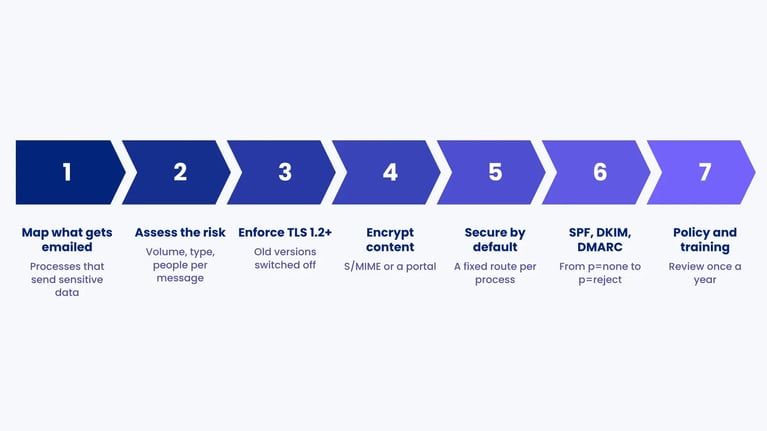
How to improve email security in seven steps
- Map what gets emailed. Find the processes where sensitive or confidential data leaves by email: HR, payroll, recruitment, customer service, case handling. Your record of processing activities is a good starting point.
- Assess the risk. Consider the volume, type and number of people per message, as Article 32 requires. Our guide to information security risk management sets out a method.
- Enforce TLS 1.2 or higher with regular partners, deploy MTA-STS for inbound mail, and switch off older versions.
- Choose a content encryption option for messages where TLS is not enough: S/MIME for partners with certificates, a portal for the public.
- Make the secure option the default. If staff have to decide every time, some will get it wrong. A fixed high-security route for a whole process is often safer.
- Roll out SPF, DKIM and DMARC and move from p=none to p=reject on a planned timeline.
- Write the rules down and train them. A short email policy, a procedure for misdirected emails and annual phishing training. Review it all once a year.
Worked example: securing email at a recruitment firm
Harbourline Recruitment Ltd and Priya Shah are fictional. We invented them for this article, and they are neither customers nor a case study.
Harbourline Recruitment has 140 staff in the UK and Ireland and sends about 2,000 emails a week to clients and candidates. Priya Shah is the data protection lead and has been asked to bring its email security up to what the ICO and the Irish Data Protection Commission would expect.
She starts by sampling one week of outbound mail. 120 emails, or 6%, contain sensitive or confidential data: candidate files with national insurance numbers, salary expectations and, in some cases, health information from occupational assessments. 80 of these go to 12 regular client domains, and 40 go to candidates on Gmail, Outlook.com and similar services.
Her solution has three parts. For the 12 client domains, IT configures forced TLS 1.2, so a message is held if the connection cannot be encrypted. Candidates receive documents through a secure portal with login, because they have no certificates and because encrypted zip files with a password by text message would need too much discipline 40 times a week. Files containing health data always go through the portal, even to clients, because regulators have said TLS alone may fall short for sensitive data in volume. Bulk emails to candidate pools stop using BCC and move to the mailing tool, as the ICO recommends.
In parallel she starts DMARC at p=none. The reports reveal seven systems sending as Harbourline, two of which fail DKIM. After six weeks they are fixed, in week eight the domain moves to p=quarantine and in week 14 to p=reject.
The result is not end-to-end encryption for all 2,000 weekly emails. It is a fixed, documented route for the 120 that matter, and a domain nobody can use to send a fake invoice. Had Harbourline worked only with corporate clients, forced TLS and S/MIME might have been enough. The solution follows the recipients and the data types.
What email security does not solve
Encryption is not a guarantee against breaches. Misdirected email is one of the most common breach types regulators see. Datatilsynet's 2022 annual report recorded 5,066 breaches caused by information being sent in error, of which 3,945 went to the wrong recipient, and the ICO calls BCC failures one of the top breaches reported to it every year. The EDPB's Guidelines 01/2021 on breach notification examples include several mailing errors. A perfectly encrypted email to the wrong person is still a breach.
Other controls help here: disabling autocomplete for external addresses, a short send delay, and data loss prevention that warns when identification numbers are about to leave the organisation.
There are further limits. End-to-end encryption can stop your own filters scanning for malware. Encrypting content does not always hide who is writing to whom, and that can be sensitive in itself, for example when the recipient is an addiction clinic. DMARC does not stop phishing from lookalike domains. And once an attacker has taken over a mailbox, every email they send is technically genuine. That is why MFA, logging and training belong in the picture.
The most effective measure is often not to send the data at all. If a national identification number can be replaced by a reference, or the data pseudonymised, the need for encryption drops.
How .legal supports email security
The technical set-up of TLS, S/MIME and DMARC happens in your mail system, not in .legal. What .legal helps with is everything around it that has to be documented: the risk assessment, the policy and the follow-up.
In the information security module you can register your mail platform as an asset, link risks and controls to it, and record which measures you chose and why. With Frameworks, one control such as your cryptography policy can be mapped to GDPR Article 32, NIS2 Article 21(2)(h) and ISO 27001 Annex A 8.24 at once, so you do not document it three times. Compliance task management turns the annual DMARC report review, certificate renewals and phishing training into recurring tasks with a named owner.
Your secure portal provider is a processor, and you can run its oversight through the vendor management module. To see how it works in practice, book a demo.






.legal compliance platform
Secure Your Email Communications with .legal
-
Document email security policies and protocols
-
Track implementation of SPF, DKIM, and DMARC
-
Monitor compliance with email security standards
-
Manage vendor email security assessments
-
Generate audit reports for email security measures





.jpeg?width=131&height=26&name=right_people_logo%20(1).jpeg)

.jpg?width=58&height=26&name=Praktiserende%20L%C3%A6gers%20Organisation%20(1).jpg)
.jpg?width=108&height=26&name=finans%20danmark%20(1).jpg)


.jpg?width=89&height=26&name=klasselotteri%20(1).jpg)

-1.png?width=34&height=26&name=bws_shipping_rgb%20-%20Kopi%20(2)-1.png)



.jpeg?width=135&height=26&name=AH%20industries%20(1).jpeg)






.jpg?width=225&height=26&name=KAUFMANN%20(1).jpg)




