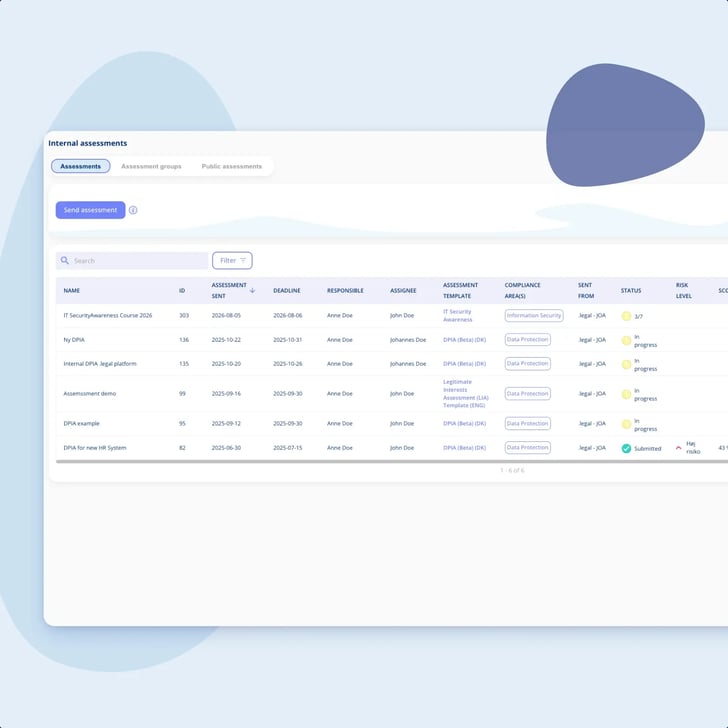
Internal assessments on the audit engine
An internal assessment is a template with its Type set to Internal, built and sent on the same engine as your supplier audits. One engine, pointed inwards at a colleague instead of outwards at a vendor.
Modules
.legal AI
All AI features →Integrations
See all integrations →Platform & features
Understand the rules
See it in action
All customer stories →Plan your switch
Stay up to date
An internal assessment goes out on the same engine you already send questionnaires with, and when it comes back you relate it to the processing activity it concerns, with its ID on it. You write the questions yourself, so a DPIA can follow your own method rather than a template of ours.
Unlimited users • Free onboarding and support • No commitment

DPIAs on the activity
Sofie Bruhn is the DPO for the whole of Meridian Nordic. When the group decided that its consumption-forecasting pilot had to be properly assessed before it went anywhere near live metering data, she had done that job before: in a document, on a shared drive, followed a year later by an afternoon spent working out which activity it had actually been about. This time she wrote the questions once, as an internal assessment, and sent it to the engineer who runs the platform with a colleague named as responsible for it. When it came back she related it to the processing activity from the activity's own tab, where it now sits with its ID next to it.

It belongs to the activity
You relate a submitted internal assessment to the processing activity it concerns, with its ID shown, and you reach it again from that activity's own audit tab.
Your questions, not ours
You build the template, section by section. There is no GDPR logic inside it, which is exactly why it can follow the method you already use.
Answered by whoever knows
Send it to a named contact person, or share a link the respondent signs themselves up on, with a note saying which project it covers.
Status without chasing
Sent, opened and submitted, with the responsible party emailed when it comes back, and older internal assessments still filterable by year.
DPIAs on the activity
Doing the DPIA is rarely the hard part. Finding it afterwards, and showing that it belonged to the activity that actually went live, is where this work usually falls down.
DPIAs on the activity
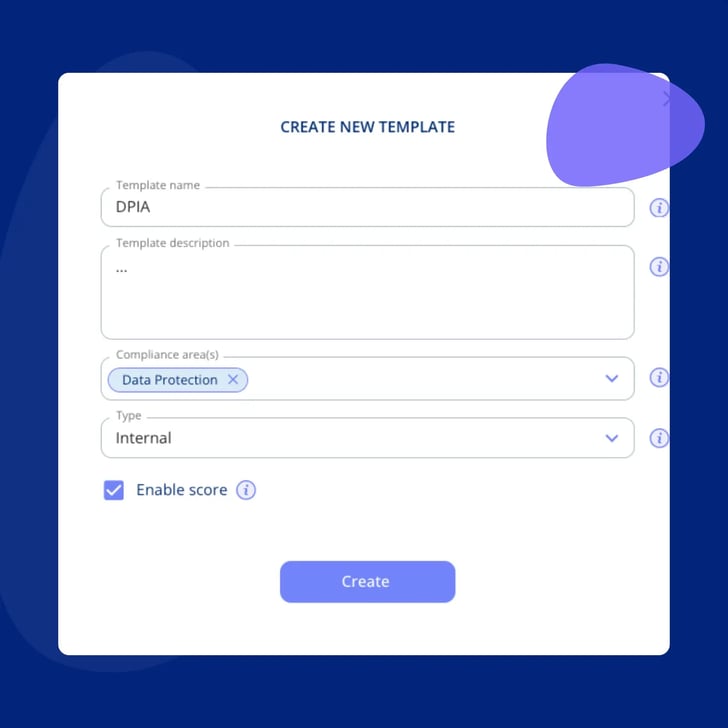
We would rather put that in writing than let a demo deliver it. What the platform has is an internal assessment: a questionnaire template with its Type set to Internal, which is what .legal built this part of the engine for.
DPIAs on the activity
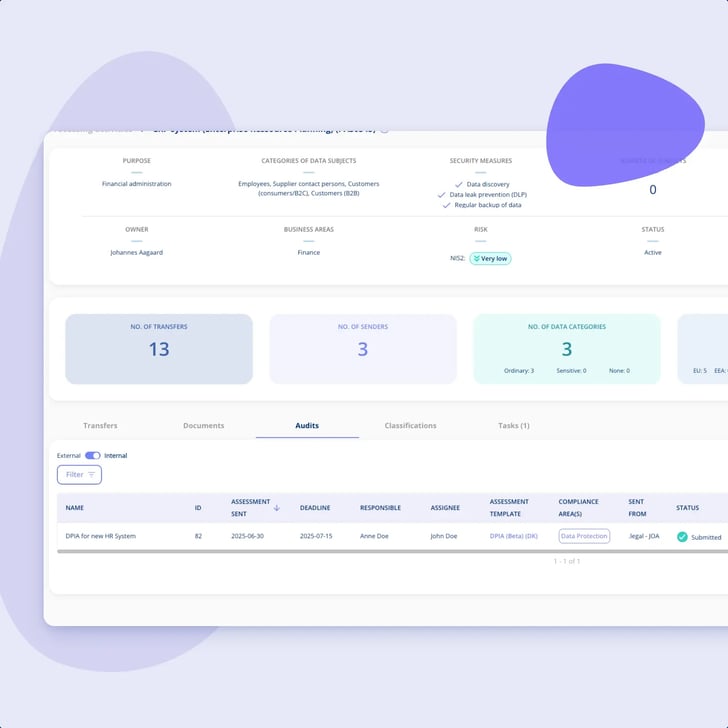
This is the part that makes the difference. You relate the submitted internal assessment to the activity it concerns, and from then on it is documentation on that activity rather than a document in a folder.
DPIAs on the activity
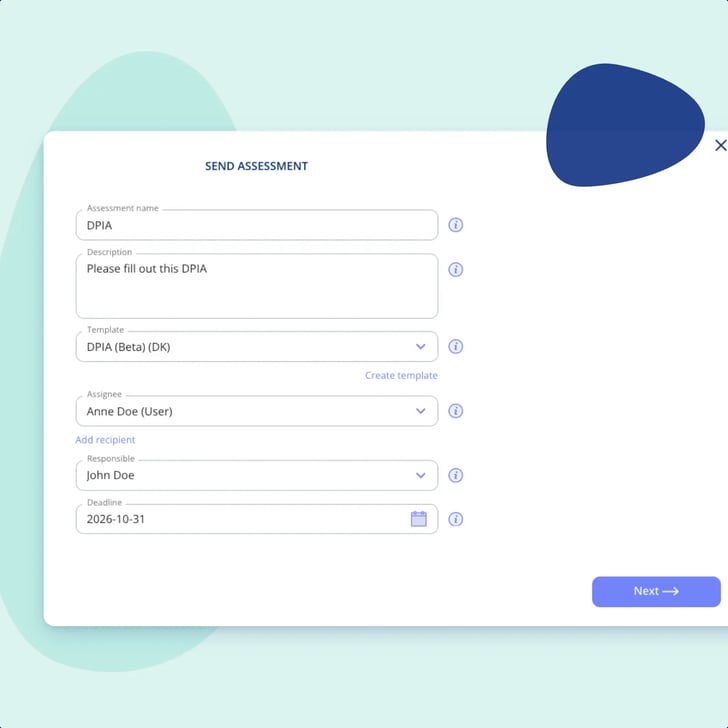
The DPO rarely holds the facts. The engineer does, or the project manager, and neither of them wants an account in a compliance platform.

DPIAs on the activity
Two facts sit next to each other here, and they are easy to blur into a promise we cannot make. So, plainly.

DPIAs on the activity
We build the plan, not the filling-in. On work like this, that line has three edges worth naming before you see a demo.
An internal assessment is a template with its Type set to Internal, built and sent on the same engine as your supplier audits. One engine, pointed inwards at a colleague instead of outwards at a vendor.
Give it an internal name, a description and the compliance areas it belongs to, then write the sections and the questions. Templates are created by administrators, and an active template is locked, so a change goes into a new version of that same template.
Processing activities and assets each carry an internal assessments tab, and that is where you relate a submitted internal assessment, with its ID in parentheses. The same tab toggles across to the external audits on that activity.
Sending means choosing the template, the recipient, who is responsible for the internal assessment and a date. The recipient is emailed on assignment, and the responsible party is emailed the moment it is submitted.
Where picking a named contact is awkward, a public link lets the respondent register with name and email. A user comment travels with the link and shows as a tooltip in the overview, naming the project the internal assessment covers.
Sent, opened and submitted, with an X of X question counter on templates that do not use branching. Year filtering keeps this year's internal assessments apart from last year's, and the compliance dashboard's latest submissions widget switches between internal assessments and external audits.
DPIAs on the activity
One regulation, and the documentation kept where the work already sits.
GDPR
Your DPIAs are GDPR work, and so are the processing activities you relate them to. .legal keeps both as documentation you can find again, rather than as documents you have to remember where you put.
Document GDPR and keep the Article 30 record current. This is where the processing activities live, and where you relate a submitted internal assessment to the one it concerns.
Explore GDPRThe subscription the audit engine comes with, which is what carries an internal assessment out to a colleague and back again. The same engine you would use for supplier audits.
Explore Vendor Managementcompanies
users
contracts
processing activities
Bech-Bruun
Mikkel Friis Rossa (Partner)
Fenerum
Rasmus Boutrup (Financial Controller)
Lægeforeningen
Michael Berner (Lawyer)
Molecule Consultancy
Nanna Rodian Christensen (HR & Operational Manager)
Plum Safety
Ulrik Dueholm Beckmann (QC, CM og ESG Lead)
Bech-Bruun
Mikkel Friis Rossa (Partner)
Fenerum
Rasmus Boutrup (Financial Controller)
Lægeforeningen
Michael Berner (Lawyer)
Molecule Consultancy
Nanna Rodian Christensen (HR & Operational Manager)
Plum Safety
Ulrik Dueholm Beckmann (QC, CM og ESG Lead)
Novicell
Julie Oxenvad (Legal Consultant)
Min By Media
Tinna Schultz (HR Manager)
DMJX
Kaspar Rochholz (GDPR Coordinator)
Axel Kaufmann ApS
Julie Lundkvist Andreasen (Lawyer and Head of Costumer Service)
NRGi
Mette Mühlendorph (Compliance Specialist)
Novicell
Julie Oxenvad (Legal Consultant)
Min By Media
Tinna Schultz (HR Manager)
DMJX
Kaspar Rochholz (GDPR Coordinator)
Axel Kaufmann ApS
Julie Lundkvist Andreasen (Lawyer and Head of Costumer Service)
NRGi
Mette Mühlendorph (Compliance Specialist)
Every use case is a real piece of compliance work, told the way it actually runs in the platform. Filter by who you are, what you work with, and which frameworks you answer to.
22 use cases
No use cases match that combination yet. Try removing a filter.

No. Better that you read it here than discover it halfway through a demo. What exists is an internal assessment: a questionnaire template with its Type set to Internal, built and sent on the same audit engine as everything else you send out. There is no DPIA object, no wizard and no GDPR logic inside it. What makes it useful for this job is the other half, which is that a submitted internal assessment can be related to the processing activity it concerns and then stays reachable from it.
A template, and it is yours. It carries an internal name, a description and the compliance areas it belongs to, and underneath that the sections and the questions you decide on. Questions come in four types: one answer from a list, several answers from a list, free text, and a date. Where your own method asks for a document to be attached, put that question to a demo, because we document the four types and not a fifth one for uploads. Creating templates is an administrator job, and an active template is locked, so a change goes into a new version of that same template rather than a second template beside it.
No. Nothing screens your processing activities and nothing flags one as needing a DPIA, and we are not going to pretend otherwise, because that judgement is legal work and it is yours. .legal is a documentation platform, not an adviser. Once you have decided that an activity needs assessing, this is where the internal assessment is run, recorded and found again.
On the processing activity, once you relate it there from the activity's own audit tab, with the assessment ID shown in parentheses so there is no doubt which one it is. Assets carry the same tab, and on an activity that tab toggles between the internal assessments and the external audits sitting on it. One thing to be clear about: an internal assessment is related to the activity, it is not merged into it, so nothing you answer in it rewrites the activity's own fields. That is deliberate. The internal assessment records what was answered at the time, and the activity keeps its own fields.
There are two routes. Either a named contact person, who is picked from the contact persons on your group companies, or a public link where the respondent registers with name and email. Neither route asks the recipient to become a user of the platform, and the link can carry a note that shows as a tooltip in the overview, which is where people usually write which project the internal assessment belongs to. One setup detail that catches people out: the contact persons on group companies are a different list from the contacts on a legal entity, which is where external audits pick their recipients.
The same engine, pointed at a supplierYou can record a date, and you should know what it does. It does not lock anything and it does not escalate: the recipient can still submit after it has passed, so the date is there for the formalities and for your own planning. After 7 days, 14 days and 21 days a reminder goes automatically to anyone who has not answered yet, and it keeps coming. The cadence is not yours to configure, so the sensible move is to build your own follow-up around it. We would rather write that down than let you discover it on the third round.
Only if you switch scoring on for the template, and it is worth being precise about what that number is. It is a generic questionnaire score, weighted the way you weighted the questions. It is not a data protection risk verdict, it does not decide anything, and it has no connection to the risk module. An unscored internal assessment is a supported setup rather than a misconfiguration, so leaving scoring off is a legitimate choice. The conclusion is something a person writes, not something the platform calculates.
They are two different objects, and they get confused often enough to be worth separating here. A vendor classification is a questionnaire you answer yourself about a supplier, and the result is a risk level for that supplier. An internal assessment is a questionnaire you send to somebody else, who answers it, and what comes back you relate to a processing activity or an asset. Different objects, different template families, different jobs. They share the machinery, and that is all they share.
From the activity, or from the year. The processing activity keeps every internal assessment related to it, each with its own ID, so the natural route is to open the activity it was about. Across the whole overview you can filter internal assessments by year, which is what makes a second round on the same activity readable next to the first one rather than a hunt through a shared drive.
Two things, and they are worth naming plainly. The processing activities sit in GDPR / Data Protection, and that is where you relate a finished internal assessment. The audit engine that carries an internal assessment out and back comes with the Vendor Management subscription, which is the same engine you would use for supplier audits and knowledge checks. If you already run processor audits, you already have what this page describes.
What a data processor is