Review user's responsibilities
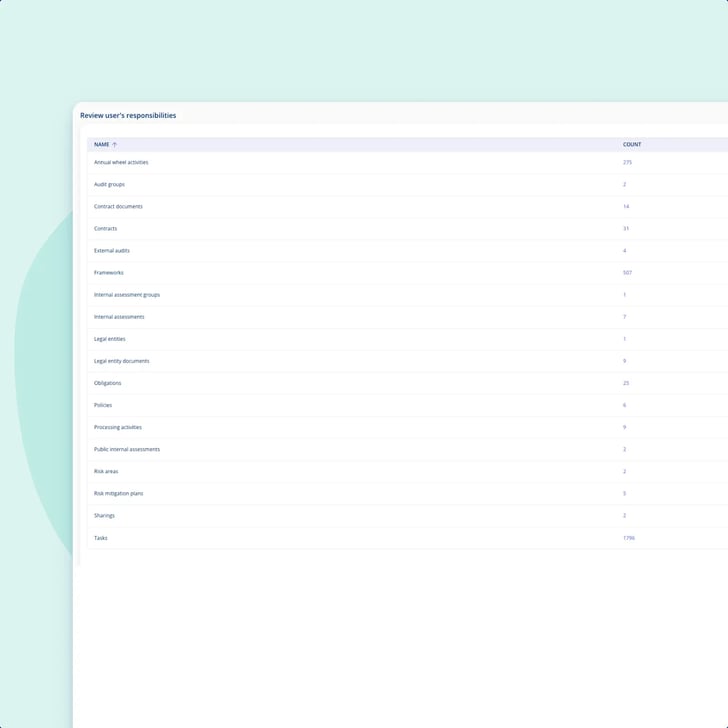
A table on the colleague's own user page listing every area where they are named, with a count on each. Empty areas are hidden, so what you are looking at is that person's actual footprint rather than a checklist.
Modules
.legal AI
All AI features →Integrations
See all integrations →Platform & features
Understand the rules
See it in action
All customer stories →Plan your switch
Stay up to date
Somebody leaves, and their name is still on contracts, processing activities, assets and the tasks that document your controls. One table on their user page lists every place they are named as responsible, with a count, and you hand each one to the colleague who should have it.
Unlimited users • Free onboarding and support • No commitment

Responsibility handover
Maria Holm is the person at Meridian Nordic who administers the platform, on top of leading GRC, which means every leaver ends up on her desk. Meridian is 850 people across three entities, so somebody changes job most months. The leaving was never the hard part. A departed colleague's name stayed on contracts as contract manager, on the tasks that document ISO 27001 controls, on processing activities and on obligations, and it usually surfaced a quarter later when a deadline went red and the reminder went to a mailbox nobody reads. Now she opens that person's own user page, reads one table of everything they were named on, and hands each piece to the colleague who should have it.

One list, one person
Every place a colleague is named as responsible sits in one table on their own user page, with a count per area.
A role, not a record
The same contract can turn up three times over, once per capacity, so the SLA can move without the contract moving with it.
All at once, or piece by piece
Move the whole lot to one colleague in a single action, or open an area and split it between several until it is empty.
The task carries the documentation
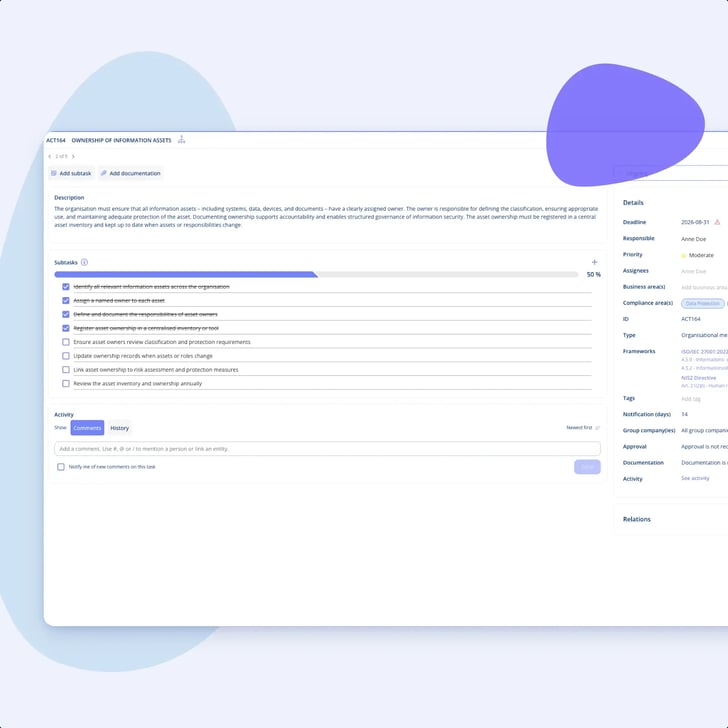
The screen itself records nothing about having been looked at. Put the review in the annual wheel, and the task it generates holds the documentation.
Responsibility handover
Nothing breaks when a colleague walks out of the door, and that is exactly why it takes so long to notice. The documentation still looks complete, because there is still a name on it.
Responsibility handover
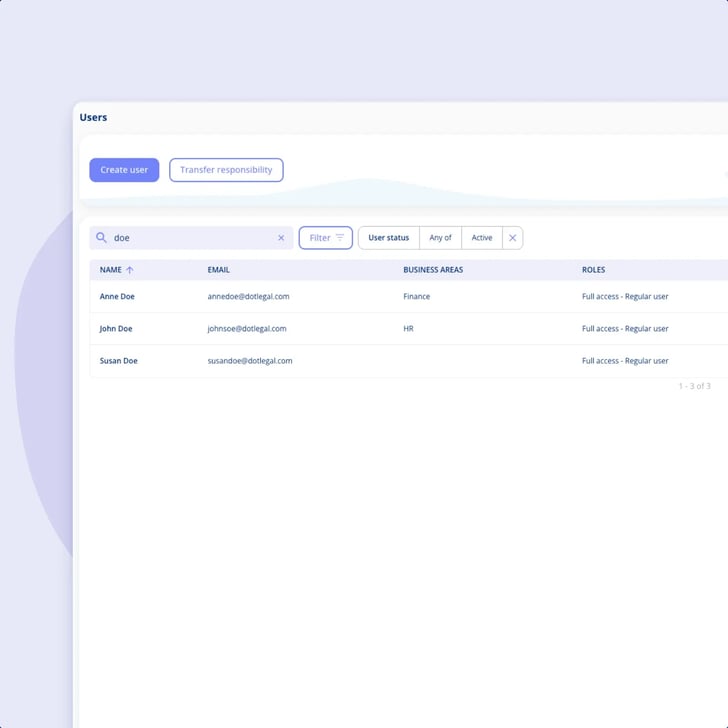
Open the colleague's user page and there is a section headed "Review user's responsibilities". It is a plain table: the area, and how many things they hold in it.
Responsibility handover
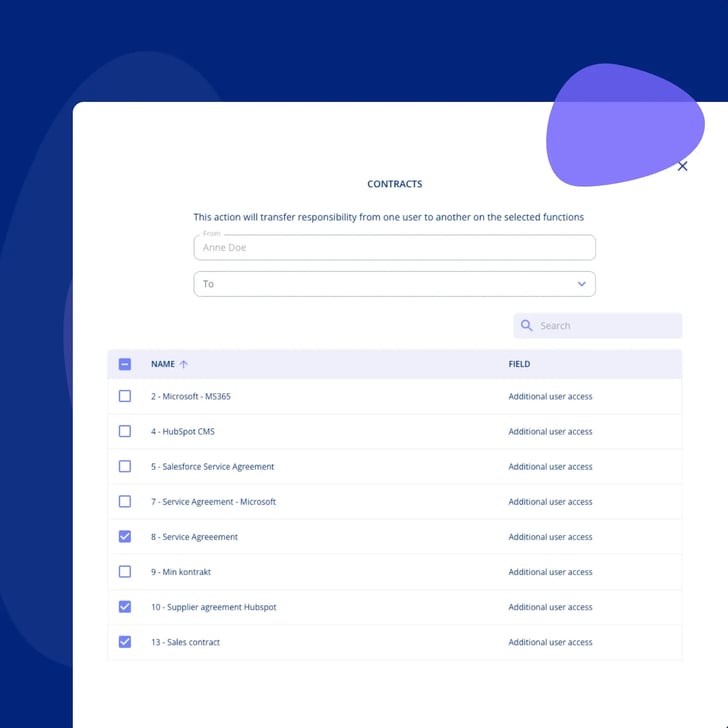
This is the detail that makes the difference between a tidy handover and a blunt one. The transfer list has a field column, so it names the capacity the person is attached in, and the same contract appears once per capacity.

Responsibility handover
Two routes, and which one you want depends on whether somebody is being replaced or being split up.
Responsibility handover
The table is on demand. You open a user when you need to, and nothing about the screen makes it periodic, so the cadence has to come from somewhere else.

Responsibility handover
We give you the list and the means to clear it. Noticing that somebody has left is still a human job, and there are three limits worth having before a demo rather than after one.
A table on the colleague's own user page listing every area where they are named, with a count on each. Empty areas are hidden, so what you are looking at is that person's actual footprint rather than a checklist.
Open an area, pick the colleague who is taking over, tick the lines and confirm. Nothing moves until you have chosen a recipient and at least one line, and it takes a role that may administer users.
The transfer list names the capacity the person holds, so one contract can appear as contract manager, as SLA responsible and in a third capacity on the same contract. You are moving the named role, not the contract.
When one colleague simply replaces another, move the whole lot from one user to the other at once instead of opening every contract by hand.
Deactivate somebody before the handover and the responsible field flags red, showing a responsible with no active user. That is a flag you get when you deactivate, not a background scan.
The screen is on demand. Where you want a cadence, an annual wheel (årshjul) activity with a frequency and an owner generates the task, and the documentation goes on the task.
Run your information security management and meet NIS2, ISO 27001 and more in one place. This is where the controls and the recurring tasks a leaver was closing actually live.
Explore Information Security ManagementKeep contracts, obligations and renewals in one overview. Contract manager, SLA responsible and the other capacities on a contract are its own fields, and they are the ones a handover moves most often.
Explore Contract Managementcompanies
users
contracts
processing activities
Bech-Bruun
Mikkel Friis Rossa (Partner)
Fenerum
Rasmus Boutrup (Financial Controller)
Lægeforeningen
Michael Berner (Lawyer)
Molecule Consultancy
Nanna Rodian Christensen (HR & Operational Manager)
Plum Safety
Ulrik Dueholm Beckmann (QC, CM og ESG Lead)
Bech-Bruun
Mikkel Friis Rossa (Partner)
Fenerum
Rasmus Boutrup (Financial Controller)
Lægeforeningen
Michael Berner (Lawyer)
Molecule Consultancy
Nanna Rodian Christensen (HR & Operational Manager)
Plum Safety
Ulrik Dueholm Beckmann (QC, CM og ESG Lead)
Novicell
Julie Oxenvad (Legal Consultant)
Min By Media
Tinna Schultz (HR Manager)
DMJX
Kaspar Rochholz (GDPR Coordinator)
Axel Kaufmann ApS
Julie Lundkvist Andreasen (Lawyer and Head of Costumer Service)
NRGi
Mette Mühlendorph (Compliance Specialist)
Novicell
Julie Oxenvad (Legal Consultant)
Min By Media
Tinna Schultz (HR Manager)
DMJX
Kaspar Rochholz (GDPR Coordinator)
Axel Kaufmann ApS
Julie Lundkvist Andreasen (Lawyer and Head of Costumer Service)
NRGi
Mette Mühlendorph (Compliance Specialist)
Every use case is a real piece of compliance work, told the way it actually runs in the platform. Filter by who you are, what you work with, and which frameworks you answer to.
22 use cases
No use cases match that combination yet. Try removing a filter.

Everywhere inside .legal a colleague is named. The table lists one row per area with a count on it, and it reaches right across the platform. The areas include contracts and the documents on them, processing activities, assets, tasks and annual wheel activities, frameworks, external audits and internal assessments, legal entities and their documents, risk areas and mitigation plans, policies, obligations and the transfers a person owns. Which rows you see depends on what your environment holds and on what that person actually owns, because empty areas are hidden. What it does not cover is access in your other systems. This is responsibility for your own documentation in .legal, and nothing wider than that.
On the colleague's own user page, in a section headed "Review user's responsibilities". It is a plain table of the area and a count, with a menu on each row and a Transfer responsibility button above it. Next to it the user card shows their role, their business areas and the group companies they reach, which is usually enough to work out who should take over. On somebody who has been closing framework tasks for a few years the count can easily run into the hundreds, and that is exactly why there is a count there rather than a list you have to scroll.
Yes, and that split is the useful part. One route moves everything a colleague holds to a single replacement in one action, which suits a straight swap. The other has you open an area and hand its items out to different colleagues until the area is empty, which suits work that is being shared out rather than passed on. Contracts, assets and processing activities are the ones that can be handed over item by item, and a long list can be searched rather than scrolled.
You see it at once. The responsible field flags red on the record, showing a responsible with no active user, and a deactivated user is removed from contract access lists automatically and can no longer be picked for a role or an assignment. What you should not expect is the platform going looking. The red flag is what you get at the moment you deactivate somebody, not a sweep running in the background, so for a colleague who was deactivated a year ago without a handover there is nothing that will surface it for you. A recurring review is how you catch those, and it is better to hear that here than to build a process on a watchdog that is not there.
As a screen it is on demand: you open a user and look. If you want it to happen every quarter, the cadence comes from the annual wheel (årshjul) rather than from the screen. You create an activity with a frequency and an owner, and it generates a task each time it falls due. That matters for a reason worth saying plainly: the review itself leaves no trail. Nothing records that a particular person looked at a particular user on a particular date, and nothing here is tied to a framework template. The task is what carries the documentation, so if you need to be able to show afterwards that the review happened, it is the task you attach it to.
Somebody with a role that may administer users. It is an administrator function rather than something you push out to the people who own the individual records, so a business area owner cannot tidy up their own corner of it themselves. Worth knowing before you design a process around it, because it means this work lands centrally with whoever administers the platform.
Usually not much of it, because of the way most people set the platform up. Something like 95% of the customers we see control access through business areas, so the department owns the contracts and access follows the department rather than the person. Somebody leaving the department does not take the department's access with them. What genuinely needs moving is the named roles on individual records, and the named-user access some organisations use on confidential agreements. Those are the lines the transfer list puts in front of you.
That is the question this table answers fastest, because tasks, annual wheel activities and frameworks are areas in it like everything else. You open the leaver, read the counts, and hand the work to whoever is picking the job up. The security documentation itself, the controls and the evidence on them, is a separate piece of work, and the platform is the record of it rather than something watching your services.
What an information security management system isSame job, and this is where the capacity level earns its keep. Somebody moving from legal to procurement keeps their account and should lose only part of what they hold. Because the transfer list is one line per capacity, you can move the SLA responsibility on a contract and leave the contract manager role exactly where it is. You pick the lines, so nothing moves that you did not tick.