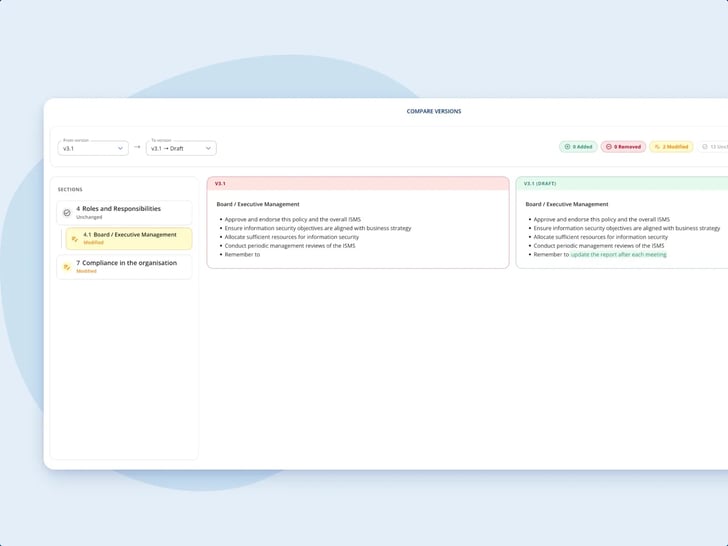
A draft beside the version in force
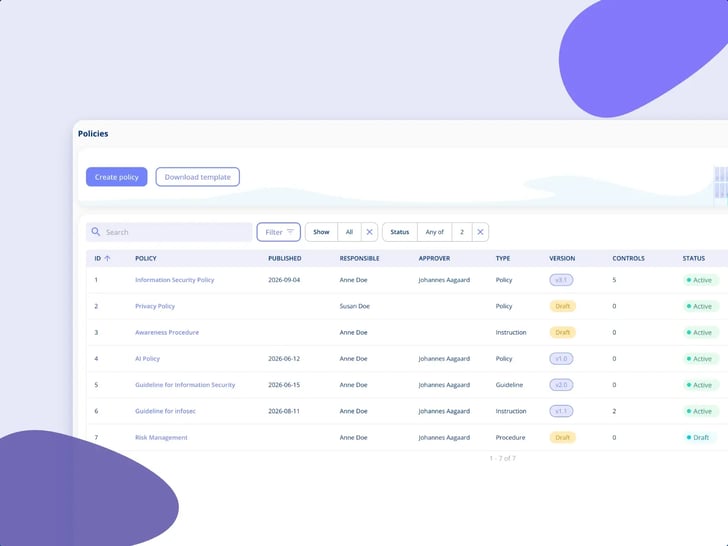
Work in a draft while the current version still applies. Write in the editor's sections and subsections, or start with Import policy from document and tidy the formatting by hand afterwards.
Modules
.legal AI
All AI features →Integrations
See all integrations →Platform & features
Understand the rules
See it in action
All customer stories →Plan your switch
Stay up to date
By policy we mean the management-approved document your colleagues have to follow. In .legal, publishing a version and asking for sign-off are two separate acts, and each version keeps its own sign-off log, so you can see who signed off v1.0 and who is still missing on v2.0.
Unlimited users • Free onboarding and support • No commitment

Policy sign-off
Anders Krogh published version 2.0 of Meridian Nordic's information security policy on a Tuesday morning, and nothing happened. Nobody got an email, which was exactly the point, because the section on privileged access that came in with this version wasn't written for 850 colleagues. He opened the Recipients and sign-offs tab, chose v2.0, picked the group of contacts on the IT business area, added the two external consultants on the network project by name and email, and sent it. By Friday the sign-off progress on v2.0 showed most of the circle in, and two still outstanding.

Publishing is quiet
Publishing makes a version current and locks it. Asking for sign-off is a separate act you start when it makes sense.
One log per version
Each version keeps its own sign-off log, so v1.0 and v2.0 never blur into one list.
No account needed
External recipients sign off with a name and an email address. They don't need a user in the platform.
No stale status on paper
Sections link to controls in your active frameworks, and the controls are left out of the PDF on purpose, so a printout never carries a status that has moved on.
Policy sign-off
Most security policies live as a file. The file gets replaced, the name picks up a v3-final at the end, and the record of who read what is an email thread.
Policy sign-off
Publishing makes a draft the current version and locks it. Publishing doesn't notify anyone, and that's deliberate.
Policy sign-off
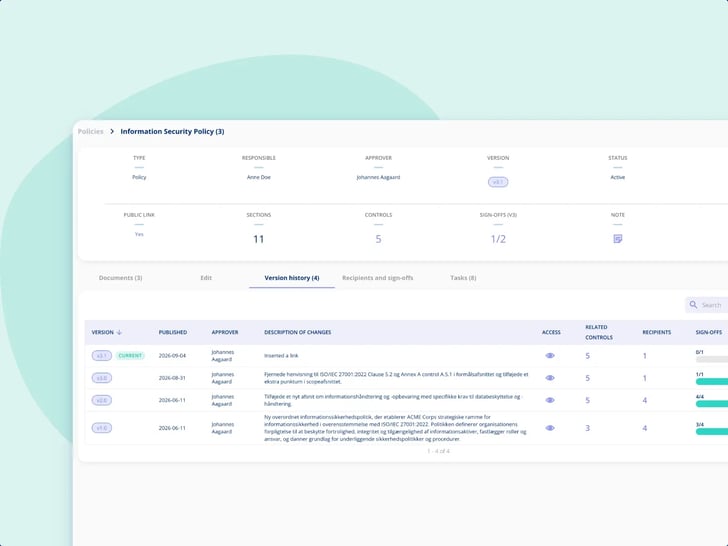
Every published version carries a short description of what changed, and a person decides how big the change was.
Policy sign-off
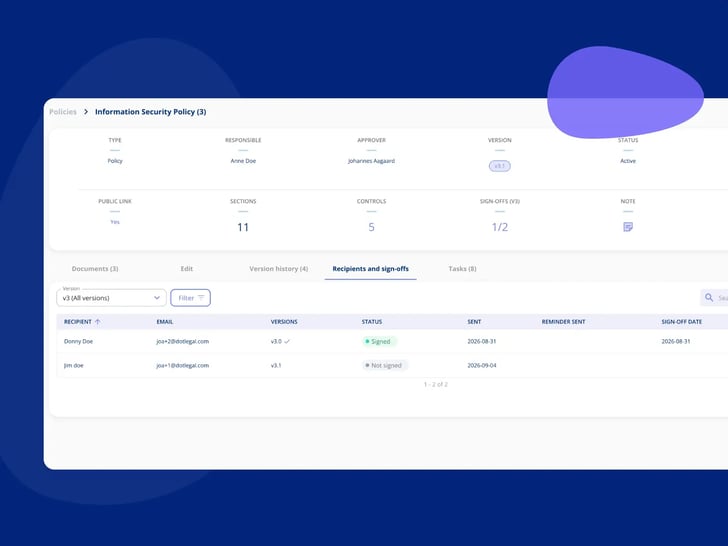
You choose who a version goes to for sign-off: a group, individual users, or external recipients by name and email. A group is the contacts grouped on a business area, so you can send to everyone in IT.

Policy sign-off
A section or subsection can be linked to controls in the frameworks you've made active, and the link runs both ways.

Policy sign-off
The recipient reads the policy and has to confirm they've read and understood it. That's what the log records, and here's what it doesn't.
Work in a draft while the current version still applies. Write in the editor's sections and subsections, or start with Import policy from document and tidy the formatting by hand afterwards.
Every version is kept with its description of changes. Pick any two and compare them side by side or inline, then choose between an editorial and a substantive increment.
Publishing generates a PDF and adds it under the Documents tab, one per version. Controls are left out on purpose, because a printed control status would be wrong the day after.
Link sections and subsections to controls in your active frameworks. From the control you can see which policies are linked to it.
Sign-off is a separate round, sent from the Recipients and sign-offs tab for the version you choose, and each version keeps its own log. Send it to a group (the contacts on one business area, such as IT), to individual users, or to external recipients by name and email, who don't need to be users in the platform.
Sign-off progress shows as a column in the Policies overview and per version in the version history. A reminder goes from the platform to one person at a time.
Policy sign-off
Two frameworks that expect the policy to exist, and a policy that can point back at their controls.
ISO 27001
ISO 27001 expects documented policies. Once the framework is active, a policy section can be linked to its controls, and from each control you can see which policies are linked to it.
NIS2
NIS2 expects documented security policies as well. With NIS2 active, policy sections link to its controls the same way, alongside ISO 27001 if you run both.
The frameworks and controls a policy section links to live here. It's information security management as documentation, so the platform records the work rather than monitoring your systems.
Explore Information Security Managementcompanies
users
contracts
processing activities
Bech-Bruun
Mikkel Friis Rossa (Partner)
Fenerum
Rasmus Boutrup (Financial Controller)
Lægeforeningen
Michael Berner (Lawyer)
Molecule Consultancy
Nanna Rodian Christensen (HR & Operational Manager)
Plum Safety
Ulrik Dueholm Beckmann (QC, CM og ESG Lead)
Bech-Bruun
Mikkel Friis Rossa (Partner)
Fenerum
Rasmus Boutrup (Financial Controller)
Lægeforeningen
Michael Berner (Lawyer)
Molecule Consultancy
Nanna Rodian Christensen (HR & Operational Manager)
Plum Safety
Ulrik Dueholm Beckmann (QC, CM og ESG Lead)
Novicell
Julie Oxenvad (Legal Consultant)
Min By Media
Tinna Schultz (HR Manager)
DMJX
Kaspar Rochholz (GDPR Coordinator)
Axel Kaufmann ApS
Julie Lundkvist Andreasen (Lawyer and Head of Costumer Service)
NRGi
Mette Mühlendorph (Compliance Specialist)
Novicell
Julie Oxenvad (Legal Consultant)
Min By Media
Tinna Schultz (HR Manager)
DMJX
Kaspar Rochholz (GDPR Coordinator)
Axel Kaufmann ApS
Julie Lundkvist Andreasen (Lawyer and Head of Costumer Service)
NRGi
Mette Mühlendorph (Compliance Specialist)
Every use case is a real piece of compliance work, told the way it actually runs in the platform. Filter by who you are, what you work with, and which frameworks you answer to.
22 use cases
No use cases match that combination yet. Try removing a filter.

No. Publishing doesn't notify anyone. It makes the draft the current version, locks it and generates a PDF of it. Asking for sign-off is a separate act, started from the Recipients and sign-offs tab, for the version you want confirmed, and it's optional for each version. Each version keeps its own sign-off log, so you can see who signed off v1.0 and who is still missing on v2.0.
Yes. You can send a policy version for sign-off to a group as well as to individual users and to external recipients by name and email. A group is a set of contacts grouped on a business area, for example everyone in IT, so you can send the version to all of IT at once. The same grouping is used when you send awareness material. The recipient list is kept, so the next version can go to the same recipients. Everyone else can read the policy through a read-only link that can't be guessed, for example on the intranet, and you choose whether that link is public.
Yes. External recipients are added by name and email and don't need to be users in the platform to receive the policy and sign off. What they see is the policy itself, with the controls and recurring tasks stripped out, because the reader needs the content, not your control status. To sign off, they confirm they've read and understood it.
It proves they confirmed it. The recipient has to state that they've read and understood the policy, and the log records that confirmation against the version. If you need to know whether the content actually landed, that's a knowledge check with questions and answers, which runs on the audit engine instead. The two sit well together, and the awareness training use case shows the other half.
From the platform, one person at a time. If someone hasn't signed off, you can send them a reminder directly, and the Recipients and sign-offs tab shows who hasn't signed off yet. Nothing goes out on a schedule by itself, so chasing is a decision somebody makes, not a cadence running in the background.
That's your call, version by version. You can send v2.0 for sign-off, and it gets its own log next to the one for v1.0, or you can publish a small editorial fix without a round at all. The platform doesn't make that decision, and publishing doesn't start a round.
When the auditor asks which version was in forceNo. You can link section by section, gather every relevant control in one closing section, or start from the framework and map its controls to the policy. Whichever route you take, a control shows which policies are linked to it. Pick the level of upkeep you can actually sustain.
What Annex A controls areBecause a printed control status is wrong the day after it's printed. Publishing generates a PDF of the version and adds it under the Documents tab, one per version, and the controls are deliberately left out. Inside the platform the policy shows its linked controls with their current status, so that's where to look.
No. We build the plan, not the filling-in. The editor is empty on purpose, so the structure and the wording are yours. If the policy already exists, Import policy from document spreads it across sections, and you'll normally need to tidy the formatting by hand afterwards. If you want a starting point, standard policy texts are available as Word files, which you edit outside the platform.
No. Policy Management is an add-on, and it's the part of the platform this page describes. The controls a policy section links to sit in the frameworks you have made active.
Policy Management