
We're excited to announce our new integration with Penneo. If you're signing contracts in Penneo, you can now automate the entire journey from signature to contract compliance with a single click.
Seamless Contract Import
The integration creates a direct bridge between Penneo and .legal. Once a contract is signed in Penneo, you can import it straight into your .legal compliance platform without any manual data entry. The signed document and contract manager is transfered automatically, so you can get straight to managing compliance instead of copying information between systems.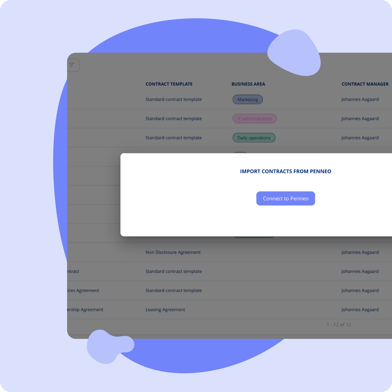

How It Works
Setup takes just a few minutes. Connect the platforms using your Penneo API key, and you're ready to go. From there, you'll see all contracts in Penneo that haven't been imported yet. Select the ones you want, assign them to the correct contract template in .legal, and the documents and data flow through automatically.
This means less time on admin tasks and fewer chances for typos or missed information. Your entire contract portfolio sits in one place, regardless of where contracts were signed, giving you a complete overview when you need it.
Getting Started
The integration is available now for all .legal users who use the contract module. If you need help setting it up, our Customer Success team is ready to walk you through the process.
Read more about the Penneo integration here
Feedback?
Got feedback? We’d love to hear it – we’re always working to make things better. 🚀 Contact us here.

.png?width=352&height=198&name=Feature%20image%20contract%20renewal%20(1).png)


.png?width=352&height=198&name=Featureimage_customerfeedback%20(1).png)




.jpeg?width=131&height=26&name=right_people_logo%20(1).jpeg)

.jpg?width=58&height=26&name=Praktiserende%20L%C3%A6gers%20Organisation%20(1).jpg)
.jpg?width=108&height=26&name=finans%20danmark%20(1).jpg)


.jpg?width=89&height=26&name=klasselotteri%20(1).jpg)

-1.png?width=34&height=26&name=bws_shipping_rgb%20-%20Kopi%20(2)-1.png)



.jpeg?width=135&height=26&name=AH%20industries%20(1).jpeg)






.jpg?width=225&height=26&name=KAUFMANN%20(1).jpg)