
Vores seneste opdatering introducerer flere forbedringer, der hjælper dig med at administrere ansvar, roller og kontraktdata mere effektivt. Vi har gjort det nemmere at omfordele brugere, organisere kontraktinformation og udføre massehandlinger ved håndtering af forpligtelser.
Gennemgå brugeransvar på tværs af enheder og overfør ansvar fra én bruger til en anden
Det kan være svært at holde styr på, hvor en bruger er tildelt ansvar på tværs af platformen, især når du skal omfordele eller fjerne en bruger. For at gøre dette nemmere har vi tilføjet en ny tabel til hver brugerprofil, der viser hvert område, hvor brugeren er angivet som ansvarlig, sammen med en optælling af, hvor mange gange vedkommende optræder i hvert område.
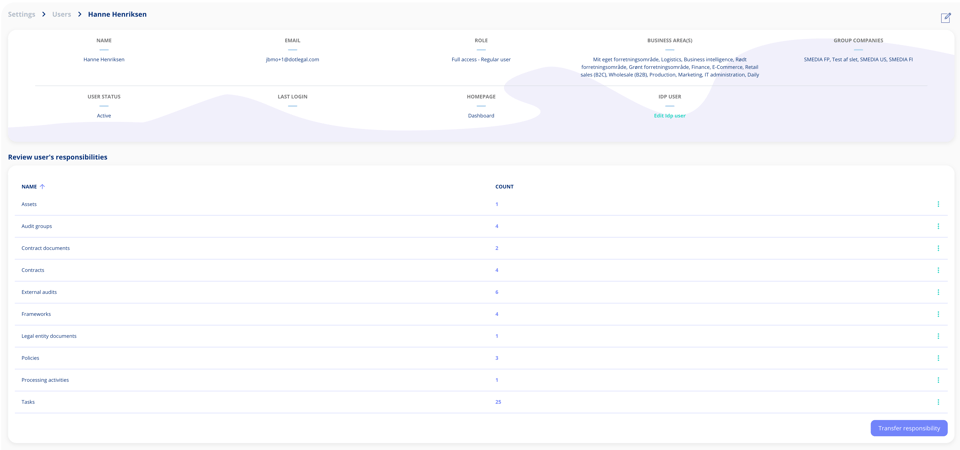
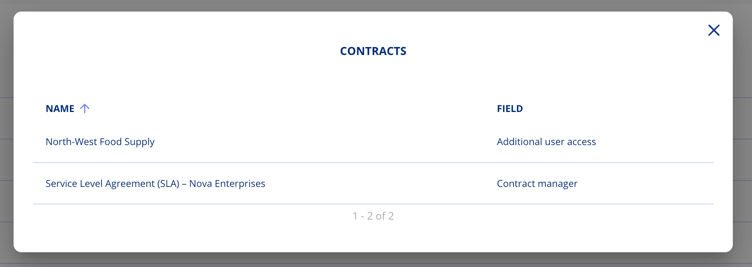
Klik på en hvilken som helst række for at se detaljerne, herunder de specifikke kontrakter, forpligtelser eller aktiviteter, vedkommende er tilknyttet, og den rolle vedkommende har i hvert tilfælde.
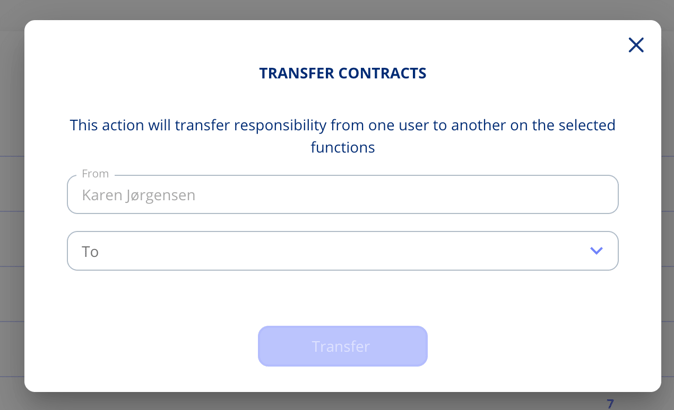
Hvis du er på et betalt abonnement eller har avanceret brugerstyring, har du også adgang til funktionen til overførsel af ansvar. Denne lader dig omfordele ansvar enten samlet til en anden bruger eller én enhed ad gangen.
Deaktivér standard brugerroller
Hvis din organisation foretrækker at arbejde med brugerdefinerede roller, kan de indbyggede standardroller begynde at fylde i listen. Du kan nu deaktivere alle de standardroller, der ikke passer til jeres opsætning, så jeres team kun ser det, der er relevant for dem.
For at deaktivere en rolle åbner du overflow-menuen ved siden af den rolle, du vil fjerne fra visningen, og vælger "Deaktivér". Rollen slettes ikke, den skjules blot fra den aktive liste.
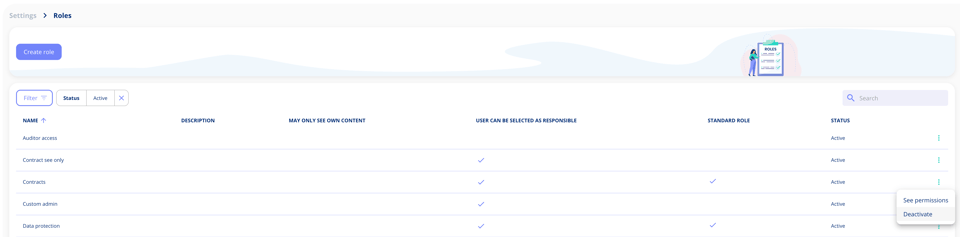
Som standard viser rollelisten kun aktive roller. Hvis du nogensinde har brug for at finde en deaktiveret rolle, enten for at gennemgå den eller genaktivere den, kan du blot bruge filtrene til at vise den igen.
Massesletning af forpligtelser
Hvis du har brug for at fjerne flere forpligtelser fra en kontrakt på én gang, kan du nu gøre det med blot få klik. En ny redigeringsmulighed lader dig gå i markeringstilstand, hvor der vises afkrydsningsfelter ved hver forpligtelse. Du kan markere individuelle forpligtelser eller vælge dem alle på én gang og derefter slette dem med en enkelt handling.
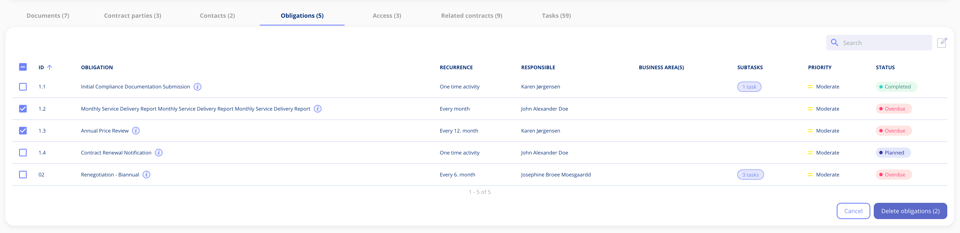
Før noget slettes, får du vist en oversigt over, hvad der er ved at blive fjernet. På det tidspunkt har du to muligheder. Du kan slette de valgte forpligtelser permanent, inklusive alle tilknyttede opgaver uanset deres status, eller du kan slette forpligtelserne sammen med kun deres kommende opgaver, mens afsluttede og igangværende opgaver bevares.
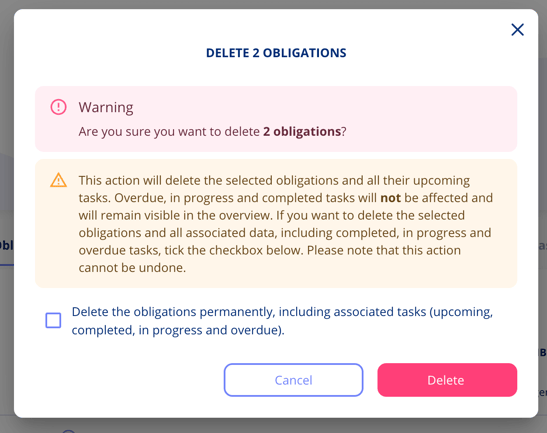
Trinbaserede faner på kontrakter
Det er nu meget nemmere at navigere i en kontrakt. I stedet for at scrolle igennem alt på én gang i fanen "Alle kontraktdata", har hvert trin nu sin egen fane øverst i kontrakten, så dit indhold er organiseret præcis, hvor du forventer det.
Gå direkte til det trin, du har brug for, og se præcis, hvad der er der, uden at grave igennem irrelevant indhold. Og hvis du skal foretage ændringer, indeholder hver fane en "Gå til trinnet"-knap, der tager dig direkte til redigeringstilstand.
Har du feedback?
Vi vil meget gerne høre fra dig! Din feedback hjælper os med løbende at forbedre platformen. Tøv ikke med at kontakte vores supportteam med dine tanker, spørgsmål eller forslag. 🚀
.png?width=352&height=198&name=Feature%20image%20contract%20renewal%20(1).png)




.jpeg?width=131&height=26&name=right_people_logo%20(1).jpeg)

.jpg?width=58&height=26&name=Praktiserende%20L%C3%A6gers%20Organisation%20(1).jpg)
.jpg?width=108&height=26&name=finans%20danmark%20(1).jpg)


.jpg?width=89&height=26&name=klasselotteri%20(1).jpg)

.png?width=34&height=26&name=bws_shipping_rgb%20-%20Kopi%20(2).png)


.jpeg?width=135&height=26&name=AH%20industries%20(1).jpeg)





.jpg?width=225&height=26&name=KAUFMANN%20(1).jpg)