Vi er glade for at dele vores februaropdateringer, der fokuserer på at gøre kontraktstyring mere effektiv og give dig bedre kontrol over adgangstilladelser. Denne release indeholder nye måder at automatisere forpligtelser, sikre datakvalitet ved kontraktoprettelse og koble politikker direkte i din opgavedokumentation.
Forpligtelsesskabeloner koblet til kontraktskabeloner
Du kan nu forbinde forpligtelsesskabeloner med kontraktskabeloner, hvilket strømliner kontraktoprettelse, når bestemte forpligtelser altid skal følge specifikke kontrakttyper.
Sådan fungerer det: Under Indstillinger > Stamdata > Forpligtelsesskabeloner kobler du en forpligtelsesskabelon til en eller flere kontraktskabeloner. Når du opretter en kontrakt med den pågældende skabelon, vises de koblede forpligtelser automatisk.
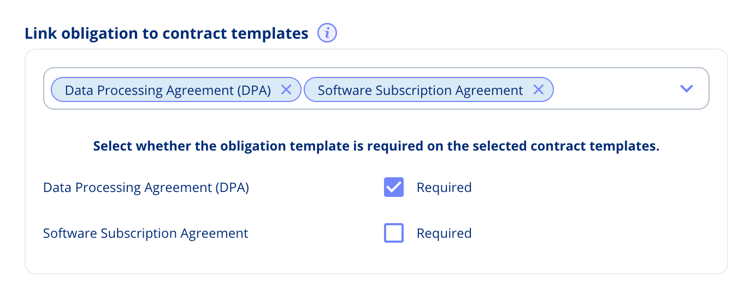
Du kan angive forpligtelser som:
- Påkrævede: Skal inkluderes for at oprette kontrakten
- Valgfrie: Tilgængelige at tilføje, men ikke obligatoriske
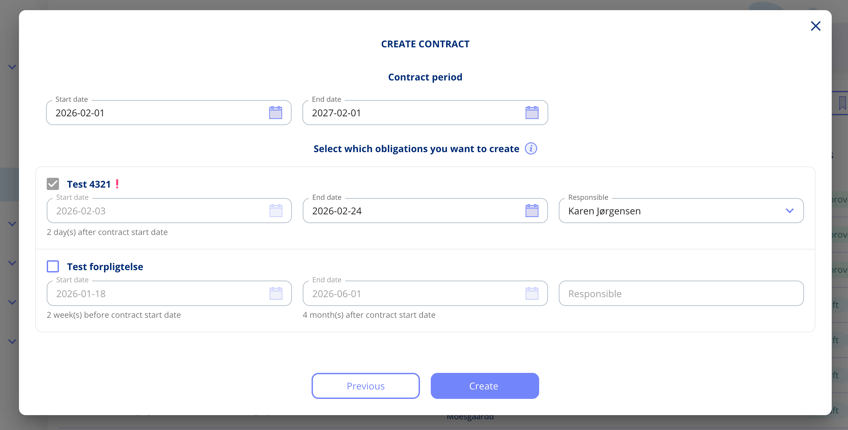
Relative datoer: Forpligtelsesskabeloner kan bruge datoer relativt til kontraktens start- og slutdato. For eksempel "Start 1 dag efter kontraktens startdato" eller "Slut 2 dage efter kontraktens slutdato".
Når du opretter kontrakten, vil du se de koblede forpligtelser med deres datoer automatisk beregnet ud fra de kontraktdatoer, du angiver. Du kan gennemgå og justere alle detaljer, før du færdiggør.
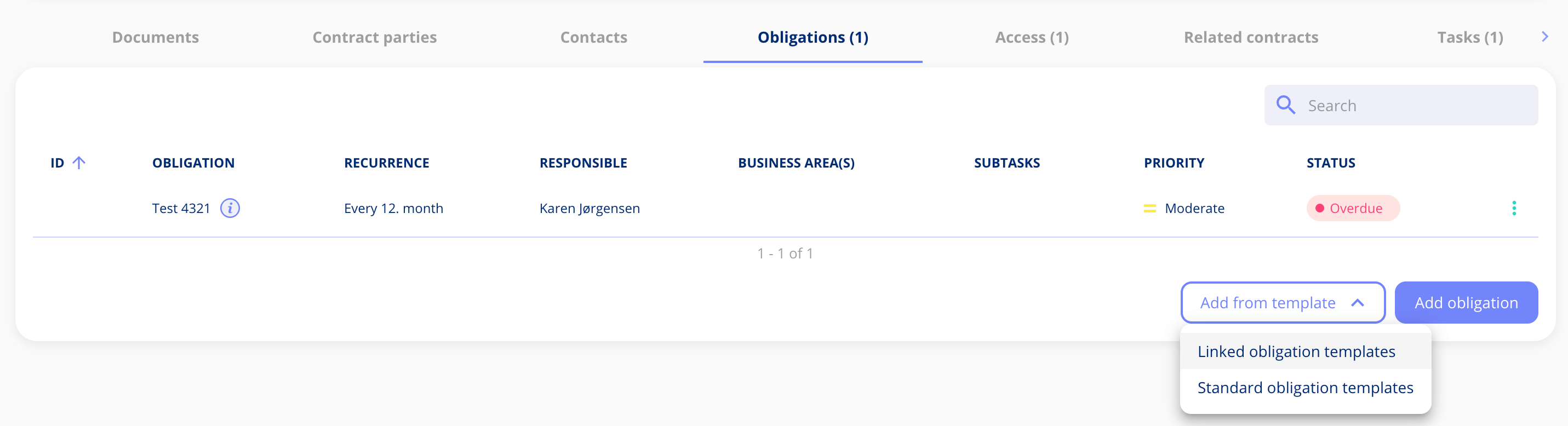
Tilføj forpligtelser senere: Hvis du springer valgfrie forpligtelser over under oprettelsen, kan du tilføje dem efterfølgende via knappen "Tilføj forpligtelse", som nu viser både standardskabeloner og koblede skabeloner for den specifikke kontraktskabelon.
Masseoverførsel af forretningsområdeadgang på kontrakter
Vi har tilføjet en ny administrativ funktion til håndtering af forretningsområder på tværs af kontrakter.
Overfør forretningsområdeadgang: Administratorer kan nu masseoverføre forretningsområder fra ét område til et andet på tværs af alle kontrakter. Når du omfordeler adgang, får brugere i det nye forretningsområde automatisk adgang til de berørte kontrakter, forudsat at de også har adgang til mindst ét af de tilknyttede koncernselskaber. Dette er nyttigt ved omstrukturering af forretningsområder eller sammenlægning af afdelinger.
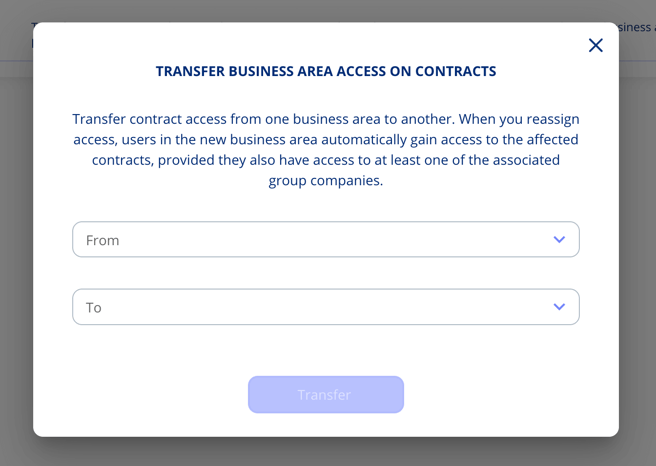
Funktionen tilgås via Indstillinger > Administrative funktioner. Vælg kilde-forretningsområdet og mål-forretningsområdet, og bekræft derefter overførslen. Systemet opdaterer alle berørte kontrakter.
Påkrævede felter ved kontraktoprettelse
Du kan nu markere kontraktskabelonfelter som "Påkrævet ved oprettelse" for at sikre, at vigtige oplysninger registreres, inden en kontrakt oprettes.
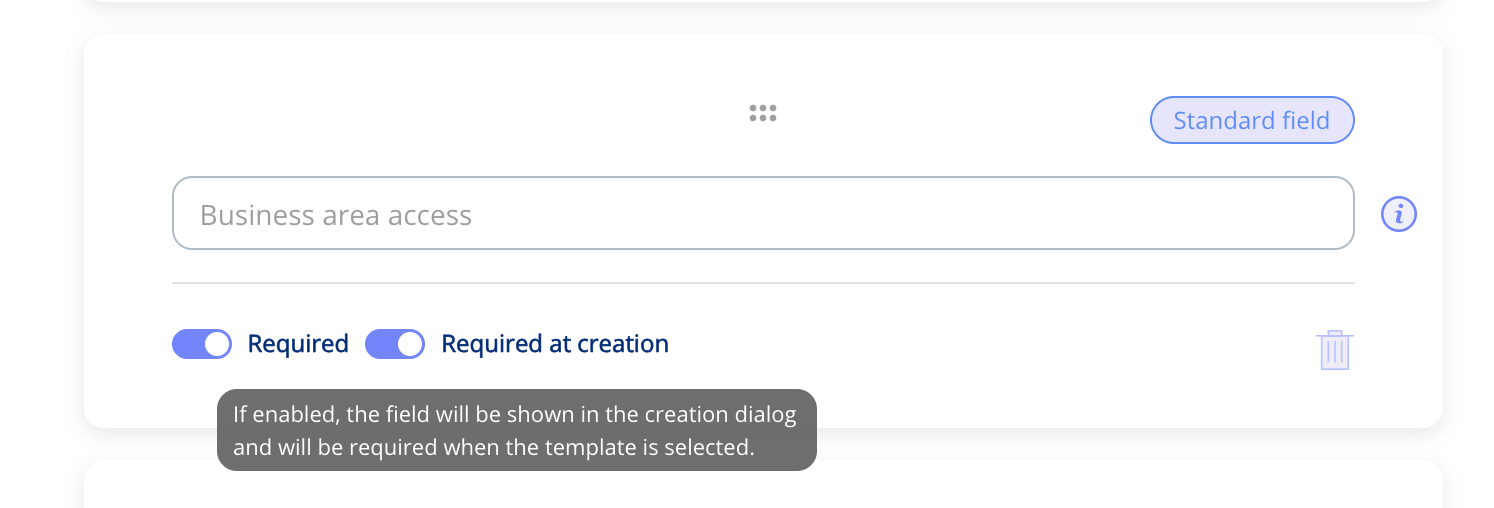
Sådan fungerer det: Når du konfigurerer dine kontraktskabeloner, markerer du ethvert standard- eller brugerdefineret felt som "Påkrævet ved oprettelse". Når brugere opretter en kontrakt med den pågældende skabelon, skal de udfylde disse påkrævede felter i oprettelsesdialogen, før kontrakten kan gemmes.
Dette sikrer, at vigtige kontraktdata registreres fra start, reducerer ufuldstændige kontrakter og forbedrer datakvaliteten på tværs af din kontraktportefølje. Påkrævede felter er tydeligt markeret i kontraktoprettelsesdialogen, så brugerne ved præcis, hvilke oplysninger der er nødvendige.
Forbedret adgangsstyring for forretningsområder på kontrakter
Vi har forfinet, hvordan forretningsområdeadgang fungerer på kontrakter, for at forbedre adgangsstyring og sikkerhed.
Adgangsbaseret valg af forretningsområde: Når du angiver forretningsområder, der styrer kontraktadgang, kan du nu kun vælge forretningsområder, du selv har tilladelse til at tilgå. Dette forhindrer utilsigtet tildeling af adgang til områder uden for dine egne tilladelser.
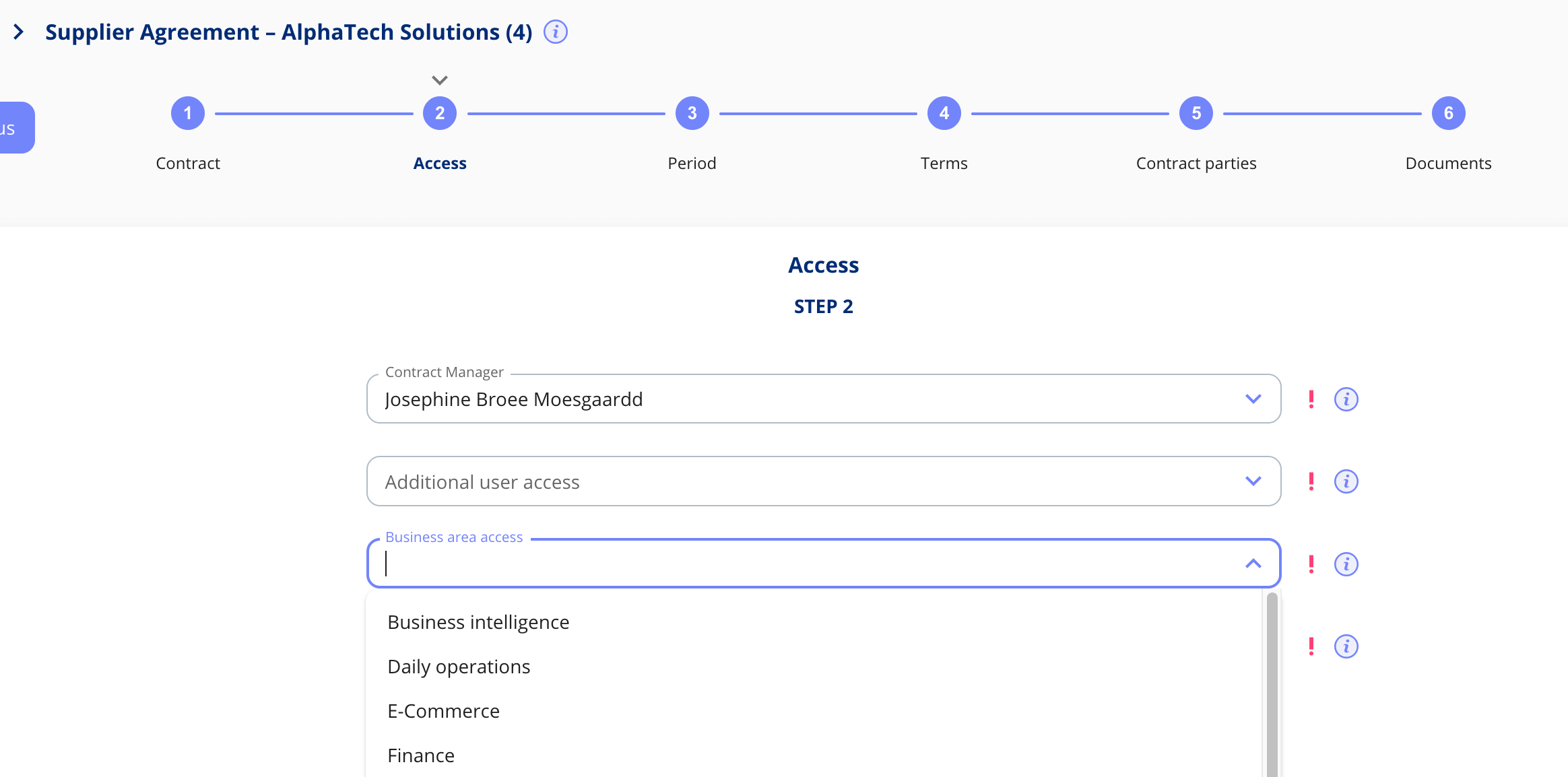
Denne begrænsning gælder kun for adgangsstyrende forretningsområder på kontrakter. Standard forretningsområdevalg andre steder i platformen forbliver ubegrænset.
Politikkobling i opgavedokumentation
Du kan nu linke direkte til politikker i opgavedokumentation i stedet for kun at vedhæfte dokumenter og links. Dette giver dig hurtig adgang til eksisterende politikker uden at uploade duplikerede filer.
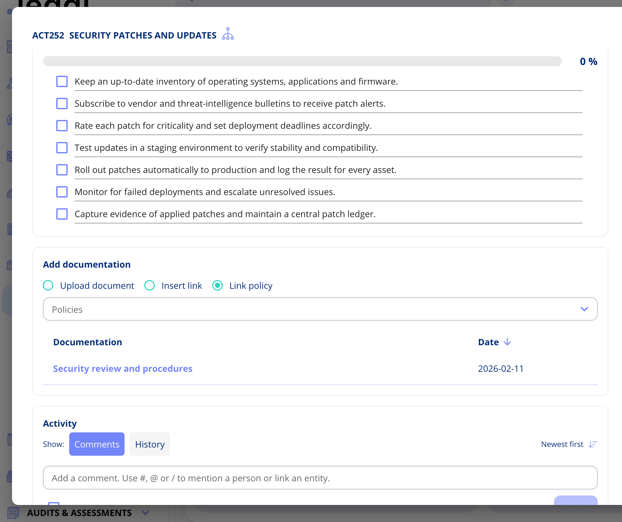
Sådan fungerer det: Når du dokumenterer en opgave, vælger du "Kobl politik" og vælger fra de politikker, der allerede er oprettet under menupunktet "Politikker" i platformen. Den koblede politik vises i din dokumentationsliste, og ved at klikke på den kommer du direkte til politikdetaljerne.
Dette er særligt nyttigt, når du refererer til compliance-politikker eller interne retningslinjer, der allerede vedligeholdes i platformen.
Behandlingsaktivitet: Skjul overførselsnavn
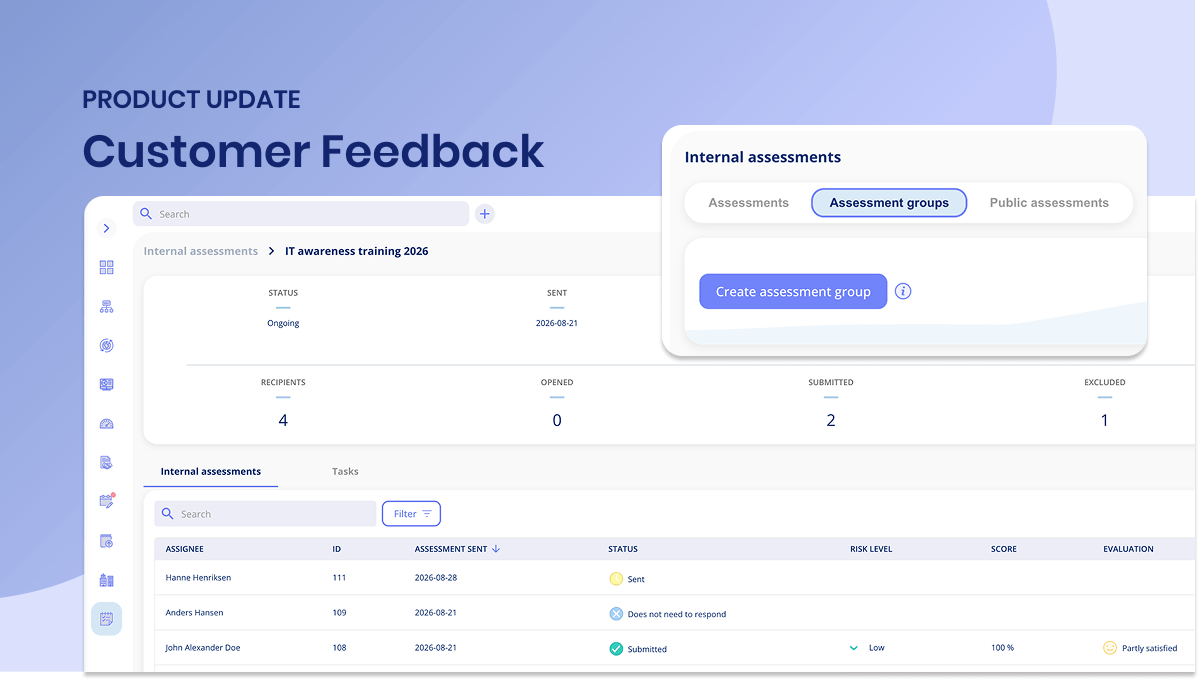
Vi har tilføjet mere detaljeret styring af overførselsnavne på behandlingsaktiviteter baseret på kundefeedback.
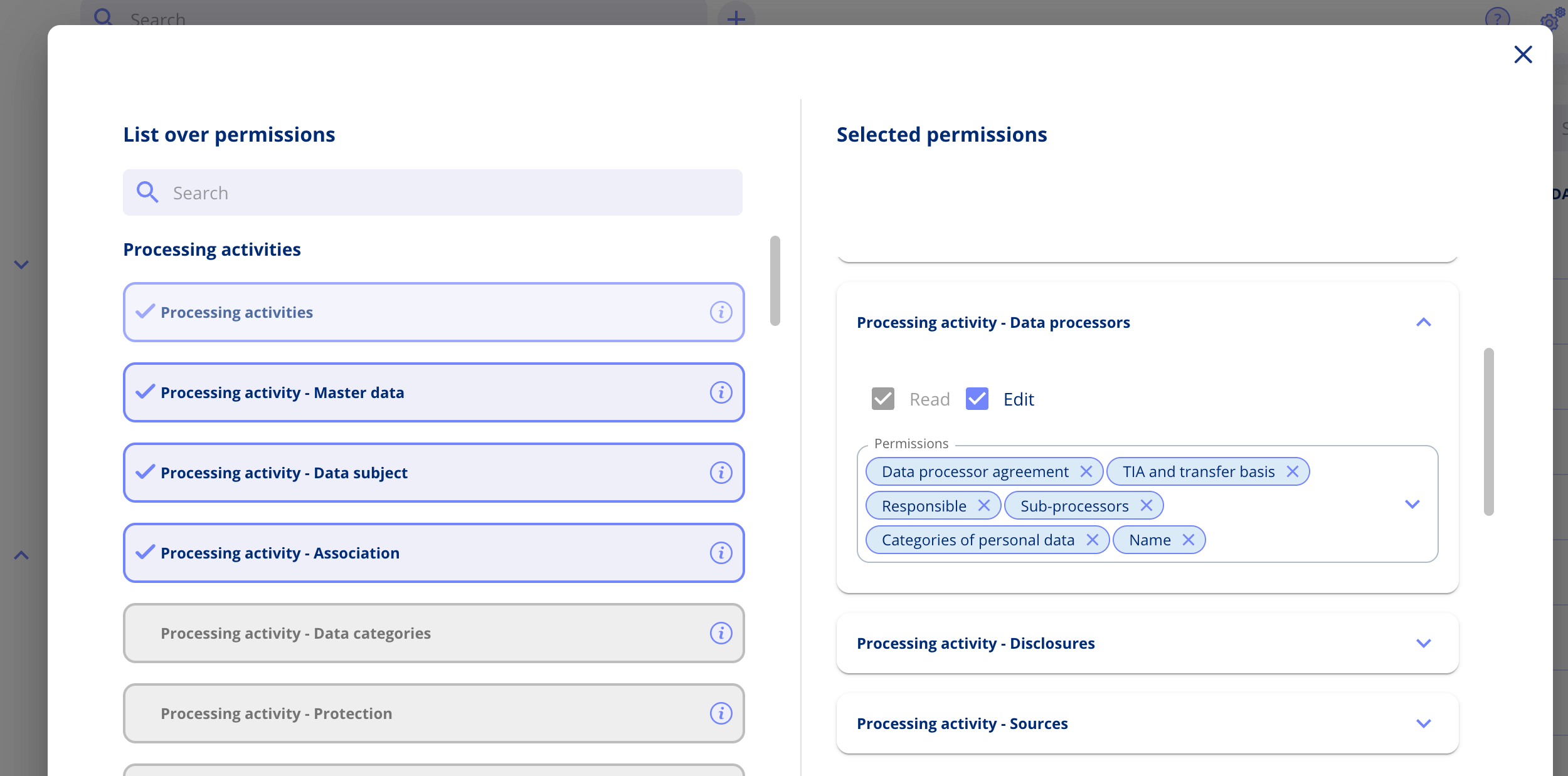
Ny tilladelse: En ny undertilladelse styrer nu, om brugere kan se og redigere overførselsnavne. Dette gælder for alle overførselstyper på behandlingsaktiviteter og angives på rolleniveau under Indstillinger > Administrér roller.
Systemnotifikationer
Vi har forbedret, hvordan systemnotifikationer vises i platformen. I stedet for kun at blive vist i notifikationscenteret, vises systemmeddelelser nu som modale dialogbokse, når du logger ind.
Sådan fungerer det: Når der er en ny systemnotifikation (såsom release-meddelelser eller vigtige opdateringer), vises en dialogboks efter login. Når den er lukket, vil du ikke se den igen, men du kan altid finde den i dit notifikationscenter, hvis du har brug for at gennemgå den.
Dette sikrer, at du ikke går glip af vigtige platformopdateringer.
Har du feedback?
Vi vil meget gerne høre fra dig! Din feedback hjælper os med løbende at forbedre platformen. Tøv ikke med at kontakte vores supportteam med dine tanker, spørgsmål eller forslag. 🚀
.png?width=1793&height=1009&name=Featureimage_customerfeedback%20(1).png)
.png?width=1194&height=672&name=Feature%20image%20assets%20(1).png)
.png?width=2198&height=1344&name=Group%2017251%20(1).png)




.jpeg?width=131&height=26&name=right_people_logo%20(1).jpeg)

.jpg?width=58&height=26&name=Praktiserende%20L%C3%A6gers%20Organisation%20(1).jpg)
.jpg?width=108&height=26&name=finans%20danmark%20(1).jpg)


.jpg?width=89&height=26&name=klasselotteri%20(1).jpg)

.png?width=68&height=52&name=bws_shipping_rgb%20-%20Kopi%20(2).png)


.jpeg?width=135&height=26&name=AH%20industries%20(1).jpeg)





.jpg?width=493&height=57&name=KAUFMANN%20(1).jpg)