
This release introduces powerful search capabilities, more flexible framework setup, and streamlined third country transfer management. Whether you're searching through thousands of documents, setting up new compliance frameworks, or managing third country transfers, these updates give you more control in your daily compliance work.
Advanced Document Search (Add on: Document search & OCR)
Not long ago we introduced our Document Search and OCR feature (read more here). We have now expanded this add-on to make it even easier to find specific documents you need across the entire compliance platform and export these lists.
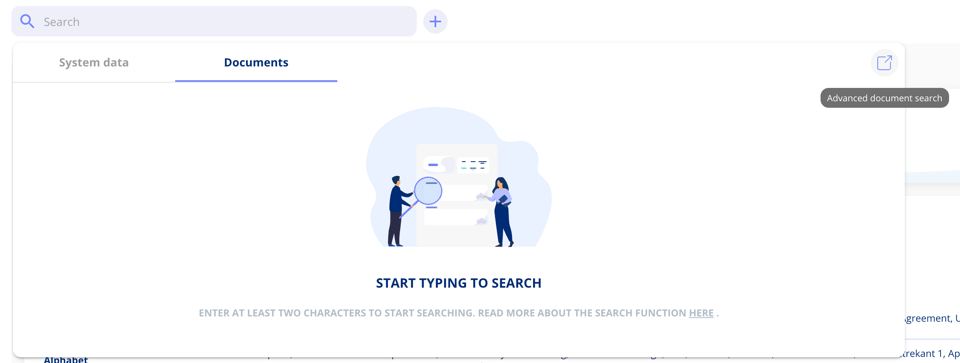
Access the advanced search through the search icon in the top right corner of the global search bar. The advanced document search works in two ways:
Text-based search
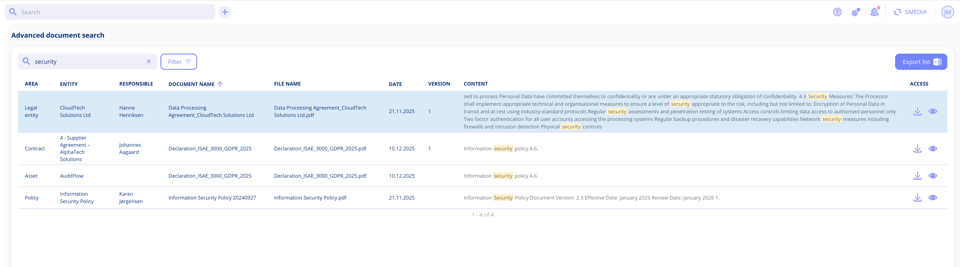
Search for specific terms within document content, just like the existing search functionality. Results show you where the term appears. You can use the same advanced search options as in the global search bar: prefix search, phrase search, boolean search. Read more about theses search methods in our previous release note. Search results display the following information:
- Area (Contract, policy, processing activity, asset etc.)
- Entity name (Name of contract, name of policy etc.).
- Responsible (Responsible for the entity such as contract manager etc.)
- Document name (The name of the file)
- Date (Creation date)
- Version (Document version number. If a document has multiple versions with matching content, each version appears as a separate row)
- Content (Preview of where your search term appears)
- Access (Preview or download the document)
Advanced filtering
Filter documents without entering search terms. Narrow down results by:
- Area (Contract, policy, processing activity, asset etc.)
- Entity name (Specific contract, policy etc.).
- Responsible (Person responsible for the entity such as contract manager etc.)
- Document status (Active, draft or archived)
- Document type (Appendix, data processor agreement, disclosure agreement etc.)
- Contract parties (Only relevant for contract documents)

Combine text search with filters to pinpoint exactly what you're looking for, or use filters alone to browse documents by category.
Export your results
Export search results directly from the interface. Click the export button after running your search, and you'll receive an email with the exported data within a few minutes.
Create Frameworks Without Tasks
You now have more flexibility when setting up compliance frameworks. When creating a new framework from our templates, you can choose to generate the control structure first and add tasks later on.
When creating a framework from a template, you'll see a new checkbox at the top: "Create controls with tasks".
- Checkbox selected: All controls are created with their predefined tasks
- Checkbox not selected: All controls are created without tasks (you can add them later)
This gives you the freedom to set up your framework structure first and plan task implementation at your own pace.
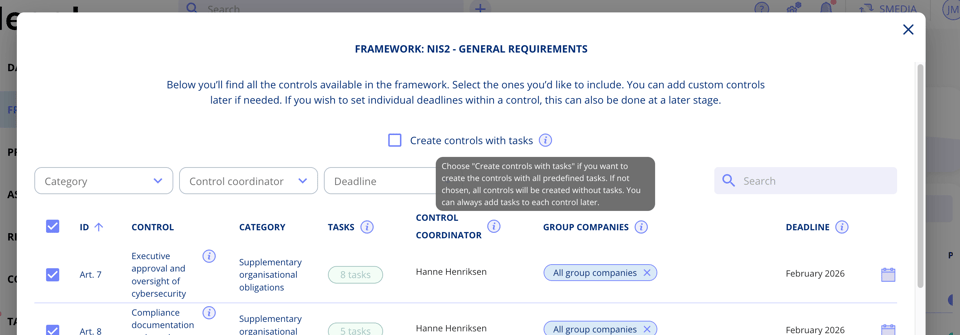
Creating frameworks from template without tasks:
When you choose to create a framework without tasks:
- All selected controls are created but appear slightly greyed out to indicate they have no associated tasks
- No task deadlines are required during setup
- No group company selection is needed initially
Adding tasks when you are ready:
Once your framework is created, you can add tasks to individual controls as needed:
- Navigate to any control in your framework
- Click "Add task from control template"
- Set the deadline and select group companies
- Create the task
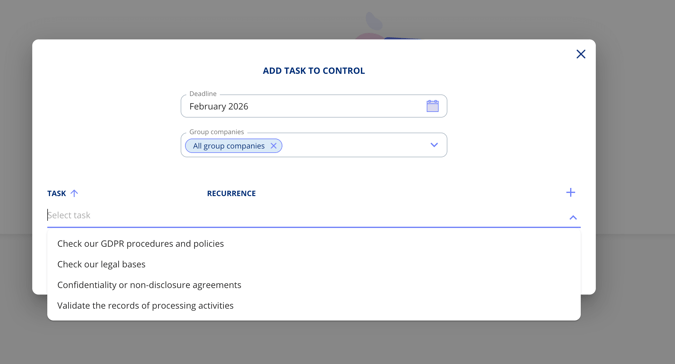
The system prevents duplicate tasks automatically. If a task already exists for the selected group companies and template, it will link to the existing task rather than creating a new one. This keeps your framework organised and avoids redundant work.
This feature gives you better control over framework implementation, allowing you to build the structure first and phase in tasks according to your organisation's priorities and capacity.
Third Country Settings on Legal Entities
When a legal entity is located in a third country, you can configure specific transfer settings directly on the entity itself.
How to access the settings
- Navigate to the legal entity
- Click the edit icon in the top right corner
- Select "Third country settings"
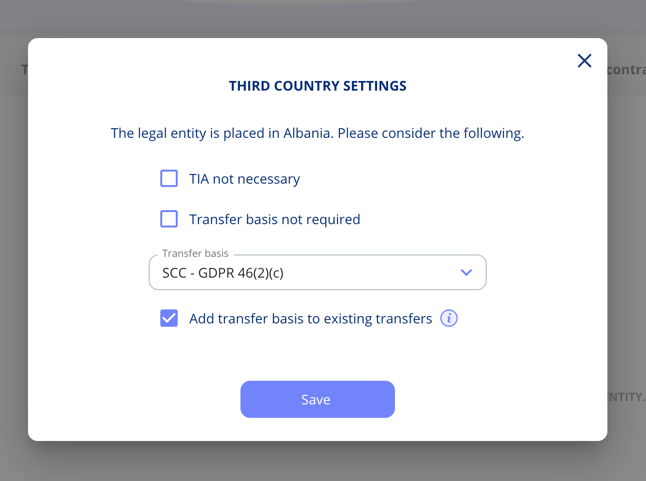
What you can configure
Transfer impact assessment (TIA): Mark whether a TIA is necessary or not for this entity.
Transfer basis requirements: Specify whether a transfer basis is required and select the appropriate level of protection.
Specific transfer basis: Choose the applicable transfer basis (e.g. SCC - GDPR 46(2)(c)). When selecting a transfer basis, you have the option to apply it automatically to all existing transfers where this legal entity acts as a data processor or sub-processor.
Create custom overviews
With our custom list add-on, you can generate a list showing all legal entities and their associated transfer basis. This makes it easy to maintain an overview of your international data transfers and ensure compliance documentation is complete.
Got Feedback?
We'd love to hear from you! Your input helps us continuously improve the platform. Please don't hesitate to reach out to our support team with your thoughts, questions, or suggestions. 🚀
.png?width=352&height=198&name=Feature%20image_AI%20quality%20scan%20(1).png)




.jpeg?width=131&height=26&name=right_people_logo%20(1).jpeg)

.jpg?width=58&height=26&name=Praktiserende%20L%C3%A6gers%20Organisation%20(1).jpg)
.jpg?width=108&height=26&name=finans%20danmark%20(1).jpg)


.jpg?width=89&height=26&name=klasselotteri%20(1).jpg)

-1.png?width=34&height=26&name=bws_shipping_rgb%20-%20Kopi%20(2)-1.png)



.jpeg?width=135&height=26&name=AH%20industries%20(1).jpeg)






.jpg?width=225&height=26&name=KAUFMANN%20(1).jpg)